
Diffusers documentation
Kandinsky 2.1
Kandinsky 2.1
Kandinsky 2.1 được tạo ra bởi Arseniy Shakhmatov, Anton Razzhigaev, Aleksandr Nikolich, Vladimir Arkhipkin, Igor Pavlov, Andrey Kuznetsov và Denis Dimitrov.
Mô tả từ trang GitHub của nó là:
Kandinsky 2.1 kế thừa các thực hành tốt nhất từ Dall-E 2 và Latent diffusion, đồng thời đưa vào một số ý tưởng mới. Với vai trò là bộ mã hóa văn bản và hình ảnh, nó sử dụng mô hình CLIP và tiên nghiệm (mapping) hình ảnh khuếch tán giữa các không gian tiềm ẩn của các chế độ CLIP. Cách tiếp cận này nâng cao hiệu suất thị giác của mô hình và mở ra những chân trời mới trong việc kết hợp hình ảnh và thao tác hình ảnh có sự dẫn dắt của văn bản.
Mã nguồn gốc có thể được tìm thấy tại ai-forever/Kandinsky-2.
Hãy xem tổ chức Kandinsky Community trên Hub để tìm các checkpoint mô hình chính thức cho các tác vụ như text-to-image, image-to-image và inpainting.
Hãy chắc chắn xem qua hướng dẫn về Schedulers để tìm hiểu cách khám phá sự đánh đổi giữa tốc độ và chất lượng của scheduler, và xem phần tái sử dụng các thành phần giữa các pipeline để tìm hiểu cách nạp các thành phần giống nhau vào nhiều pipeline một cách hiệu quả.
Hãy đảm bảo bạn đã cài đặt các thư viện sau.
# uncomment to install the necessary libraries in Colab
#!pip install -q diffusers transformers accelerate
Cách sử dụng Kandinsky 2.1 và 2.2 rất giống nhau! Điểm khác biệt duy nhất là Kandinsky 2.2 không nhận
promptlàm đầu vào khi giải mã các latents. Thay vào đó, Kandinsky 2.2 chỉ nhậnimage_embedstrong quá trình giải mã.
Kandinsky 3 có kiến trúc gọn gàng hơn và không yêu cầu mô hình trước. Điều này có nghĩa là cách sử dụng của nó giống hệt với các mô hình khuếch tán khác như Stable Diffusion XL.
Văn bản sang hình ảnh
Để sử dụng các mô hình Kandinsky cho bất kỳ tác vụ nào, bạn luôn bắt đầu bằng cách thiết lập prior pipeline để mã hóa prompt và tạo ra image embeddings. Prior pipeline cũng tạo ra negative_image_embeds tương ứng với negative prompt "". Để có kết quả tốt hơn, bạn có thể truyền một negative_prompt thực tế vào prior pipeline, nhưng điều này sẽ làm tăng kích thước batch hiệu dụng của prior pipeline lên gấp đôi.
from diffusers import KandinskyPriorPipeline, KandinskyPipeline
import torch

prior_pipeline = KandinskyPriorPipeline.from_pretrained("kandinsky-community/kandinsky-2-1-prior", dtype=torch.float16).to("cuda")  # or "mps", "xpu", "cpu"
pipeline = KandinskyPipeline.from_pretrained("kandinsky-community/kandinsky-2-1", dtype=torch.float16).to("cuda")

prompt = "A alien cheeseburger creature eating itself, claymation, cinematic, moody lighting"
negative_prompt = "low quality, bad quality" # optional to include a negative prompt, but results are usually better
image_embeds, negative_image_embeds = prior_pipeline(prompt, negative_prompt, guidance_scale=1.0).to_tuple()
Bây giờ, truyền tất cả các prompt và embeddings vào KandinskyPipeline để tạo ra một hình ảnh:
image = pipeline(prompt, image_embeds=image_embeds, negative_prompt=negative_prompt, negative_image_embeds=negative_image_embeds, height=768, width=768).images[0]
image
from diffusers import KandinskyV22PriorPipeline, KandinskyV22Pipeline
import torch

prior_pipeline = KandinskyV22PriorPipeline.from_pretrained("kandinsky-community/kandinsky-2-2-prior", dtype=torch.float16).to("cuda")  # or "mps", "xpu", "cpu"
pipeline = KandinskyV22Pipeline.from_pretrained("kandinsky-community/kandinsky-2-2-decoder", dtype=torch.float16).to("cuda")

prompt = "A alien cheeseburger creature eating itself, claymation, cinematic, moody lighting"
negative_prompt = "low quality, bad quality" # optional to include a negative prompt, but results are usually better
image_embeds, negative_image_embeds = prior_pipeline(prompt, guidance_scale=1.0).to_tuple()
Truyền image_embeds và negative_image_embeds vào KandinskyV22Pipeline để tạo ảnh:
image = pipeline(image_embeds=image_embeds, negative_image_embeds=negative_image_embeds, height=768, width=768).images[0]
image
Kandinsky 3 không yêu cầu mô hình trước đó nên bạn có thể tải trực tiếp Kandinsky3Pipeline và truyền một prompt để tạo ảnh:
from diffusers import Kandinsky3Pipeline
import torch

pipeline = Kandinsky3Pipeline.from_pretrained("kandinsky-community/kandinsky-3", variant="fp16", dtype=torch.float16)
pipeline.enable_model_cpu_offload()

prompt = "A alien cheeseburger creature eating itself, claymation, cinematic, moody lighting"
image = pipeline(prompt).images[0]
image
🤗 Diffusers cũng cung cấp một API end-to-end với KandinskyCombinedPipeline và KandinskyV22CombinedPipeline, nghĩa là bạn không cần phải tải riêng pipeline prior và pipeline text-to-image. Pipeline kết hợp sẽ tự động tải cả mô hình prior và decoder. Bạn vẫn có thể đặt các giá trị khác nhau cho pipeline prior bằng các tham số prior_guidance_scale và prior_num_inference_steps nếu muốn.
Sử dụng AutoPipelineForText2Image để tự động gọi các pipeline kết hợp bên trong:
from diffusers import AutoPipelineForText2Image
import torch

pipeline = AutoPipelineForText2Image.from_pretrained("kandinsky-community/kandinsky-2-1", dtype=torch.float16)
pipeline.enable_model_cpu_offload()

prompt = "A alien cheeseburger creature eating itself, claymation, cinematic, moody lighting"
negative_prompt = "low quality, bad quality"

image = pipeline(prompt=prompt, negative_prompt=negative_prompt, prior_guidance_scale=1.0, guidance_scale=4.0, height=768, width=768).images[0]
imagefrom diffusers import AutoPipelineForText2Image
import torch
pipeline = AutoPipelineForText2Image.from_pretrained("kandinsky-community/kandinsky-2-2-decoder", dtype=torch.float16)
pipeline.enable_model_cpu_offload()
prompt = "A alien cheeseburger creature eating itself, claymation, cinematic, moody lighting"
negative_prompt = "low quality, bad quality"
image = pipeline(prompt=prompt, negative_prompt=negative_prompt, prior_guidance_scale=1.0, guidance_scale=4.0, height=768, width=768).images[0]
imageẢnh sang ảnh
Đối với image-to-image, hãy truyền ảnh ban đầu và prompt văn bản để điều kiện hóa ảnh vào pipeline. Bắt đầu bằng cách tải pipeline prior:
import torch
from diffusers import KandinskyImg2ImgPipeline, KandinskyPriorPipeline

prior_pipeline = KandinskyPriorPipeline.from_pretrained("kandinsky-community/kandinsky-2-1-prior", dtype=torch.float16, use_safetensors=True).to("cuda")  # or "mps", "xpu", "cpu"
pipeline = KandinskyImg2ImgPipeline.from_pretrained("kandinsky-community/kandinsky-2-1", dtype=torch.float16, use_safetensors=True).to("cuda")import torch
from diffusers import KandinskyV22Img2ImgPipeline, KandinskyPriorPipeline
prior_pipeline = KandinskyPriorPipeline.from_pretrained("kandinsky-community/kandinsky-2-2-prior", dtype=torch.float16, use_safetensors=True).to("cuda") # or "mps", "xpu", "cpu"
pipeline = KandinskyV22Img2ImgPipeline.from_pretrained("kandinsky-community/kandinsky-2-2-decoder", dtype=torch.float16, use_safetensors=True).to("cuda")Kandinsky 3 không yêu cầu mô hình trước đó nên bạn có thể tải trực tiếp pipeline image-to-image:
from diffusers import Kandinsky3Img2ImgPipeline
from diffusers.utils import load_image
import torch

pipeline = Kandinsky3Img2ImgPipeline.from_pretrained("kandinsky-community/kandinsky-3", variant="fp16", dtype=torch.float16)
pipeline.enable_model_cpu_offload()
Tải xuống một hình ảnh để làm điều kiện:
from diffusers.utils import load_image

# download image
url = "https://raw.githubusercontent.com/CompVis/stable-diffusion/main/assets/stable-samples/img2img/sketch-mountains-input.jpg"
original_image = load_image(url)
original_image = original_image.resize((768, 512))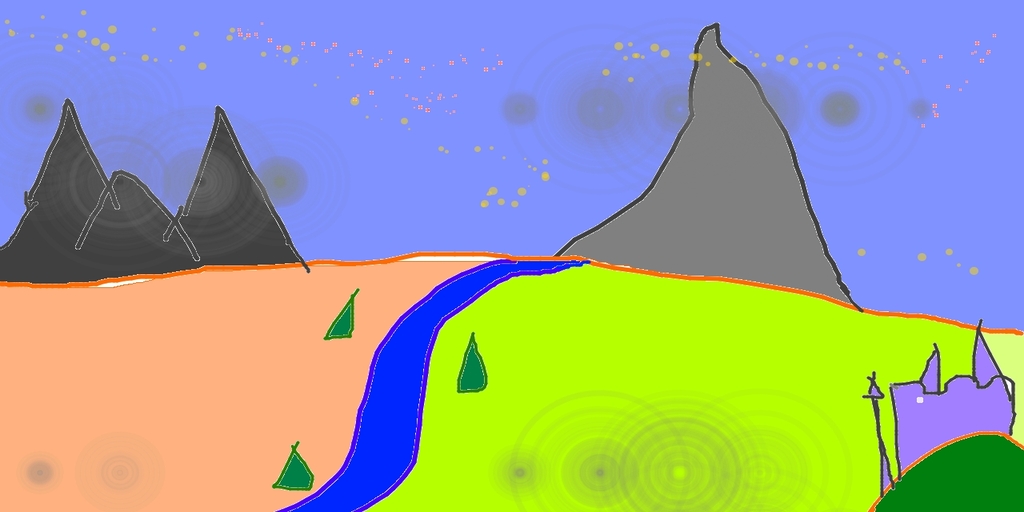
Tạo image_embeds và negative_image_embeds bằng pipeline trước đó:
prompt = "A fantasy landscape, Cinematic lighting"
negative_prompt = "low quality, bad quality"

image_embeds, negative_image_embeds = prior_pipeline(prompt, negative_prompt).to_tuple()
Bây giờ, truyền ảnh gốc, cùng tất cả các prompt và embeddings vào pipeline để tạo ảnh:
from diffusers.utils import make_image_grid

image = pipeline(prompt, negative_prompt=negative_prompt, image=original_image, image_embeds=image_embeds, negative_image_embeds=negative_image_embeds, height=768, width=768, strength=0.3).images[0]
make_image_grid([original_image.resize((512, 512)), image.resize((512, 512))], rows=1, cols=2)
from diffusers.utils import make_image_grid

image = pipeline(image=original_image, image_embeds=image_embeds, negative_image_embeds=negative_image_embeds, height=768, width=768, strength=0.3).images[0]
make_image_grid([original_image.resize((512, 512)), image.resize((512, 512))], rows=1, cols=2)
image = pipeline(prompt, negative_prompt=negative_prompt, image=image, strength=0.75, num_inference_steps=25).images[0]
image
🤗 Diffusers cũng cung cấp một API end-to-end với KandinskyImg2ImgCombinedPipeline và KandinskyV22Img2ImgCombinedPipeline, nghĩa là bạn không cần phải tải riêng pipeline prior và pipeline image-to-image. Pipeline kết hợp sẽ tự động tải cả mô hình prior và decoder. Bạn vẫn có thể đặt các giá trị khác nhau cho pipeline prior bằng các tham số prior_guidance_scale và prior_num_inference_steps nếu muốn.
Sử dụng AutoPipelineForImage2Image để tự động gọi các pipeline kết hợp bên trong:
from diffusers import AutoPipelineForImage2Image
from diffusers.utils import make_image_grid, load_image
import torch

pipeline = AutoPipelineForImage2Image.from_pretrained("kandinsky-community/kandinsky-2-1", dtype=torch.float16, use_safetensors=True)
pipeline.enable_model_cpu_offload()

prompt = "A fantasy landscape, Cinematic lighting"
negative_prompt = "low quality, bad quality"

url = "https://raw.githubusercontent.com/CompVis/stable-diffusion/main/assets/stable-samples/img2img/sketch-mountains-input.jpg"
original_image = load_image(url)

original_image.thumbnail((768, 768))

image = pipeline(prompt=prompt, negative_prompt=negative_prompt, image=original_image, strength=0.3).images[0]
make_image_grid([original_image.resize((512, 512)), image.resize((512, 512))], rows=1, cols=2)from diffusers import AutoPipelineForImage2Image
from diffusers.utils import make_image_grid, load_image
import torch
pipeline = AutoPipelineForImage2Image.from_pretrained("kandinsky-community/kandinsky-2-2-decoder", dtype=torch.float16)
pipeline.enable_model_cpu_offload()
prompt = "A fantasy landscape, Cinematic lighting"
negative_prompt = "low quality, bad quality"
url = "https://raw.githubusercontent.com/CompVis/stable-diffusion/main/assets/stable-samples/img2img/sketch-mountains-input.jpg"
original_image = load_image(url)
original_image.thumbnail((768, 768))
image = pipeline(prompt=prompt, negative_prompt=negative_prompt, image=original_image, strength=0.3).images[0]
make_image_grid([original_image.resize((512, 512)), image.resize((512, 512))], rows=1, cols=2)Inpainting
⚠️ Các mô hình Kandinsky hiện sử dụng ⬜️ pixel trắng để biểu diễn vùng bị che thay vì pixel đen. Nếu bạn đang sử dụng KandinskyInpaintPipeline trong môi trường production, bạn cần thay đổi mask để sử dụng pixel trắng:
# For PIL input
import PIL.ImageOps
mask = PIL.ImageOps.invert(mask)

# For PyTorch and NumPy input
mask = 1 - mask
Đối với inpainting, bạn sẽ cần hình ảnh gốc, một mask của vùng cần thay thế trong hình ảnh gốc, và một text prompt mô tả nội dung cần inpaint. Tải pipeline trước đó:
from diffusers import KandinskyInpaintPipeline, KandinskyPriorPipeline
from diffusers.utils import load_image, make_image_grid
import torch
import numpy as np
from PIL import Image

prior_pipeline = KandinskyPriorPipeline.from_pretrained("kandinsky-community/kandinsky-2-1-prior", dtype=torch.float16, use_safetensors=True).to("cuda")  # or "mps", "xpu", "cpu"
pipeline = KandinskyInpaintPipeline.from_pretrained("kandinsky-community/kandinsky-2-1-inpaint", dtype=torch.float16, use_safetensors=True).to("cuda")from diffusers import KandinskyV22InpaintPipeline, KandinskyV22PriorPipeline
from diffusers.utils import load_image, make_image_grid
import torch
import numpy as np
from PIL import Image
prior_pipeline = KandinskyV22PriorPipeline.from_pretrained("kandinsky-community/kandinsky-2-2-prior", dtype=torch.float16, use_safetensors=True).to("cuda") # or "mps", "xpu", "cpu"
pipeline = KandinskyV22InpaintPipeline.from_pretrained("kandinsky-community/kandinsky-2-2-decoder-inpaint", dtype=torch.float16, use_safetensors=True).to("cuda")Tải một hình ảnh ban đầu và tạo một mặt nạ:
init_image = load_image("https://huggingface.co/datasets/hf-internal-testing/diffusers-images/resolve/main/kandinsky/cat.png")
mask = np.zeros((768, 768), dtype=np.float32)
# mask area above cat's head
mask[:250, 250:-250] = 1
Tạo các embedding bằng pipeline trước đó:
prompt = "a hat"
prior_output = prior_pipeline(prompt)
Bây giờ, truyền ảnh ban đầu, mặt nạ, prompt và embeddings vào pipeline để tạo ảnh:
output_image = pipeline(prompt, image=init_image, mask_image=mask, **prior_output, height=768, width=768, num_inference_steps=150).images[0]
mask = Image.fromarray((mask*255).astype('uint8'), 'L')
make_image_grid([init_image, mask, output_image], rows=1, cols=3)
output_image = pipeline(image=init_image, mask_image=mask, **prior_output, height=768, width=768, num_inference_steps=150).images[0]
mask = Image.fromarray((mask*255).astype('uint8'), 'L')
make_image_grid([init_image, mask, output_image], rows=1, cols=3)
Bạn cũng có thể sử dụng KandinskyInpaintCombinedPipeline và KandinskyV22InpaintCombinedPipeline end-to-end để gọi các pipeline prior và decoder cùng nhau bên trong. Hãy dùng AutoPipelineForInpainting cho mục đích này:
import torch
import numpy as np
from PIL import Image
from diffusers import AutoPipelineForInpainting
from diffusers.utils import load_image, make_image_grid

pipe = AutoPipelineForInpainting.from_pretrained("kandinsky-community/kandinsky-2-1-inpaint", dtype=torch.float16)
pipe.enable_model_cpu_offload()

init_image = load_image("https://huggingface.co/datasets/hf-internal-testing/diffusers-images/resolve/main/kandinsky/cat.png")
mask = np.zeros((768, 768), dtype=np.float32)
# mask area above cat's head
mask[:250, 250:-250] = 1
prompt = "a hat"

output_image = pipe(prompt=prompt, image=init_image, mask_image=mask).images[0]
mask = Image.fromarray((mask*255).astype('uint8'), 'L')
make_image_grid([init_image, mask, output_image], rows=1, cols=3)import torch
import numpy as np
from PIL import Image
from diffusers import AutoPipelineForInpainting
from diffusers.utils import load_image, make_image_grid
pipe = AutoPipelineForInpainting.from_pretrained("kandinsky-community/kandinsky-2-2-decoder-inpaint", dtype=torch.float16)
pipe.enable_model_cpu_offload()
init_image = load_image("https://huggingface.co/datasets/hf-internal-testing/diffusers-images/resolve/main/kandinsky/cat.png")
mask = np.zeros((768, 768), dtype=np.float32)
# mask area above cat's head
mask[:250, 250:-250] = 1
prompt = "a hat"
output_image = pipe(prompt=prompt, image=original_image, mask_image=mask).images[0]
mask = Image.fromarray((mask*255).astype('uint8'), 'L')
make_image_grid([init_image, mask, output_image], rows=1, cols=3)Nội suy
Interpolation cho phép bạn khám phá không gian ẩn giữa các embedding của hình ảnh và văn bản, đây là một cách thú vị để xem một số đầu ra trung gian của mô hình prior. Tải pipeline prior và hai hình ảnh mà bạn muốn nội suy:
from diffusers import KandinskyPriorPipeline, KandinskyPipeline
from diffusers.utils import load_image, make_image_grid
import torch

prior_pipeline = KandinskyPriorPipeline.from_pretrained("kandinsky-community/kandinsky-2-1-prior", dtype=torch.float16, use_safetensors=True).to("cuda")  # or "mps", "xpu", "cpu"
img_1 = load_image("https://huggingface.co/datasets/hf-internal-testing/diffusers-images/resolve/main/kandinsky/cat.png")
img_2 = load_image("https://huggingface.co/datasets/hf-internal-testing/diffusers-images/resolve/main/kandinsky/starry_night.jpeg")
make_image_grid([img_1.resize((512,512)), img_2.resize((512,512))], rows=1, cols=2)from diffusers import KandinskyV22PriorPipeline, KandinskyV22Pipeline
from diffusers.utils import load_image, make_image_grid
import torch
prior_pipeline = KandinskyV22PriorPipeline.from_pretrained("kandinsky-community/kandinsky-2-2-prior", dtype=torch.float16, use_safetensors=True).to("cuda") # or "mps", "xpu", "cpu"
img_1 = load_image("https://huggingface.co/datasets/hf-internal-testing/diffusers-images/resolve/main/kandinsky/cat.png")
img_2 = load_image("https://huggingface.co/datasets/hf-internal-testing/diffusers-images/resolve/main/kandinsky/starry_night.jpeg")
make_image_grid([img_1.resize((512,512)), img_2.resize((512,512))], rows=1, cols=2)

Chỉ định văn bản hoặc hình ảnh cần nội suy, và đặt trọng số cho từng văn bản hoặc hình ảnh. Thử nghiệm với các trọng số để xem chúng ảnh hưởng đến quá trình nội suy như thế nào!
images_texts = ["a cat", img_1, img_2]
weights = [0.3, 0.3, 0.4]
Gọi hàm interpolate để tạo các embeddings, sau đó truyền chúng vào pipeline để tạo ảnh:
# prompt can be left empty
prompt = ""
prior_out = prior_pipeline.interpolate(images_texts, weights)

pipeline = KandinskyPipeline.from_pretrained("kandinsky-community/kandinsky-2-1", dtype=torch.float16, use_safetensors=True).to("cuda")  # or "mps", "xpu", "cpu"

image = pipeline(prompt, **prior_out, height=768, width=768).images[0]
image
# prompt can be left empty
prompt = ""
prior_out = prior_pipeline.interpolate(images_texts, weights)

pipeline = KandinskyV22Pipeline.from_pretrained("kandinsky-community/kandinsky-2-2-decoder", dtype=torch.float16, use_safetensors=True).to("cuda")  # or "mps", "xpu", "cpu"

image = pipeline(prompt, **prior_out, height=768, width=768).images[0]
image
ControlNet
⚠️ ControlNet chỉ được hỗ trợ cho Kandinsky 2.2!
ControlNet cho phép điều kiện hóa các mô hình khuếch tán được huấn luyện trước có quy mô lớn bằng các đầu vào bổ sung như bản đồ độ sâu hoặc phát hiện cạnh. Ví dụ, bạn có thể điều kiện hóa Kandinsky 2.2 bằng một bản đồ độ sâu để mô hình hiểu và giữ nguyên cấu trúc của hình ảnh độ sâu.
Hãy tải một hình ảnh và trích xuất bản đồ độ sâu của nó:
from diffusers.utils import load_image

img = load_image(
    "https://huggingface.co/datasets/hf-internal-testing/diffusers-images/resolve/main/kandinskyv22/cat.png"
).resize((768, 768))
img
Sau đó, bạn có thể sử dụng Pipeline depth-estimation từ 🤗 Transformers để xử lý hình ảnh và lấy bản đồ độ sâu:
import torch
import numpy as np

from transformers import pipeline

def make_hint(image, depth_estimator):
    image = depth_estimator(image)["depth"]
    image = np.array(image)
    image = image[:, :, None]
    image = np.concatenate([image, image, image], axis=2)
    detected_map = torch.from_numpy(image).float() / 255.0
    hint = detected_map.permute(2, 0, 1)
    return hint

depth_estimator = pipeline("depth-estimation")
hint = make_hint(img, depth_estimator).unsqueeze(0).half().to("cuda")  # or "mps", "xpu", "cpu"
Văn bản sang hình ảnh
Tải pipeline trước đó và KandinskyV22ControlnetPipeline:
from diffusers import KandinskyV22PriorPipeline, KandinskyV22ControlnetPipeline

prior_pipeline = KandinskyV22PriorPipeline.from_pretrained(
    "kandinsky-community/kandinsky-2-2-prior", dtype=torch.float16, use_safetensors=True
).to("cuda")  # or "mps", "xpu", "cpu"

pipeline = KandinskyV22ControlnetPipeline.from_pretrained(
    "kandinsky-community/kandinsky-2-2-controlnet-depth", dtype=torch.float16
).to("cuda")
Tạo các embedding ảnh từ một prompt và một negative prompt:
prompt = "A robot, 4k photo"
negative_prior_prompt = "lowres, text, error, cropped, worst quality, low quality, jpeg artifacts, ugly, duplicate, morbid, mutilated, out of frame, extra fingers, mutated hands, poorly drawn hands, poorly drawn face, mutation, deformed, blurry, dehydrated, bad anatomy, bad proportions, extra limbs, cloned face, disfigured, gross proportions, malformed limbs, missing arms, missing legs, extra arms, extra legs, fused fingers, too many fingers, long neck, username, watermark, signature"

generator = torch.Generator(device="cuda").manual_seed(43)  # or "mps", "xpu", "cpu"

image_emb, zero_image_emb = prior_pipeline(
    prompt=prompt, negative_prompt=negative_prior_prompt, generator=generator
).to_tuple()
Cuối cùng, truyền các embedding ảnh và ảnh độ sâu vào KandinskyV22ControlnetPipeline để tạo ra một hình ảnh:
image = pipeline(image_embeds=image_emb, negative_image_embeds=zero_image_emb, hint=hint, num_inference_steps=50, generator=generator, height=768, width=768).images[0]
image
Ảnh sang ảnh
Đối với image-to-image với ControlNet, bạn sẽ cần sử dụng:
- KandinskyV22PriorEmb2EmbPipeline để tạo ra các nhúng hình ảnh từ một câu lệnh văn bản và một hình ảnh
- KandinskyV22ControlnetImg2ImgPipeline để tạo ảnh từ ảnh ban đầu và các embedding của ảnh
Xử lý và trích xuất bản đồ độ sâu của một hình ảnh ban đầu của một con mèo bằng Pipeline depth-estimation từ 🤗 Transformers:
import torch
import numpy as np

from diffusers import KandinskyV22PriorEmb2EmbPipeline, KandinskyV22ControlnetImg2ImgPipeline
from diffusers.utils import load_image
from transformers import pipeline

img = load_image(
    "https://huggingface.co/datasets/hf-internal-testing/diffusers-images/resolve/main/kandinskyv22/cat.png"
).resize((768, 768))

def make_hint(image, depth_estimator):
    image = depth_estimator(image)["depth"]
    image = np.array(image)
    image = image[:, :, None]
    image = np.concatenate([image, image, image], axis=2)
    detected_map = torch.from_numpy(image).float() / 255.0
    hint = detected_map.permute(2, 0, 1)
    return hint

depth_estimator = pipeline("depth-estimation")
hint = make_hint(img, depth_estimator).unsqueeze(0).half().to("cuda")  # or "mps", "xpu", "cpu"
Tải pipeline trước đó và KandinskyV22ControlnetImg2ImgPipeline:
prior_pipeline = KandinskyV22PriorEmb2EmbPipeline.from_pretrained(
    "kandinsky-community/kandinsky-2-2-prior", dtype=torch.float16, use_safetensors=True
).to("cuda")  # or "mps", "xpu", "cpu"

pipeline = KandinskyV22ControlnetImg2ImgPipeline.from_pretrained(
    "kandinsky-community/kandinsky-2-2-controlnet-depth", dtype=torch.float16
).to("cuda")
Truyền một prompt văn bản và hình ảnh ban đầu vào pipeline prior để tạo ra các embedding hình ảnh:
prompt = "A robot, 4k photo"
negative_prior_prompt = "lowres, text, error, cropped, worst quality, low quality, jpeg artifacts, ugly, duplicate, morbid, mutilated, out of frame, extra fingers, mutated hands, poorly drawn hands, poorly drawn face, mutation, deformed, blurry, dehydrated, bad anatomy, bad proportions, extra limbs, cloned face, disfigured, gross proportions, malformed limbs, missing arms, missing legs, extra arms, extra legs, fused fingers, too many fingers, long neck, username, watermark, signature"

generator = torch.Generator(device="cuda").manual_seed(43)  # or "mps", "xpu", "cpu"

img_emb = prior_pipeline(prompt=prompt, image=img, strength=0.85, generator=generator)
negative_emb = prior_pipeline(prompt=negative_prior_prompt, image=img, strength=1, generator=generator)
Bây giờ bạn có thể chạy KandinskyV22ControlnetImg2ImgPipeline để tạo ra một hình ảnh từ hình ảnh ban đầu và các vector nhúng của hình ảnh:
image = pipeline(image=img, strength=0.5, image_embeds=img_emb.image_embeds, negative_image_embeds=negative_emb.image_embeds, hint=hint, num_inference_steps=50, generator=generator, height=768, width=768).images[0]
make_image_grid([img.resize((512, 512)), image.resize((512, 512))], rows=1, cols=2)
Tối ưu hóa
Kandinsky có điểm khác biệt ở chỗ nó yêu cầu một pipeline trước để tạo ra các ánh xạ, và một pipeline thứ hai để giải mã các ẩn (latents) thành ảnh. Các nỗ lực tối ưu hóa nên tập trung vào pipeline thứ hai vì phần lớn phép tính được thực hiện ở đó. Dưới đây là một số mẹo để cải thiện Kandinsky trong quá trình suy luận (inference).
- Bật xFormers nếu bạn đang sử dụng PyTorch < 2.0:
  from diffusers import DiffusionPipeline
  import torch

  pipe = DiffusionPipeline.from_pretrained("kandinsky-community/kandinsky-2-1", dtype=torch.float16)
+ pipe.enable_xformers_memory_efficient_attention()- Bật
torch.compilenếu bạn đang dùng PyTorch >= 2.0 để tự động sử dụng scaled dot-product attention (SDPA):
  pipe.unet.to(memory_format=torch.channels_last)
+ pipe.unet = torch.compile(pipe.unet, mode="reduce-overhead", fullgraph=True)
Điều này tương đương với việc thiết lập bộ xử lý chú ý (attention processor) để sử dụng AttnAddedKVProcessor2_0 một cách tường minh:
from diffusers.models.attention_processor import AttnAddedKVProcessor2_0

pipe.unet.set_attn_processor(AttnAddedKVProcessor2_0())- Tải mô hình xuống CPU bằng enable_model_cpu_offload() để tránh lỗi hết bộ nhớ:
  from diffusers import DiffusionPipeline
  import torch

  pipe = DiffusionPipeline.from_pretrained("kandinsky-community/kandinsky-2-1", dtype=torch.float16)
+ pipe.enable_model_cpu_offload()- Mặc định, pipeline text-to-image sử dụng DDIMScheduler nhưng bạn có thể thay thế nó bằng một scheduler khác như DDPMScheduler để xem điều đó ảnh hưởng thế nào đến sự đánh đổi giữa tốc độ suy luận và chất lượng hình ảnh:
from diffusers import DDPMScheduler
from diffusers import DiffusionPipeline

scheduler = DDPMScheduler.from_pretrained("kandinsky-community/kandinsky-2-1", subfolder="ddpm_scheduler")
pipe = DiffusionPipeline.from_pretrained("kandinsky-community/kandinsky-2-1", scheduler=scheduler, dtype=torch.float16, use_safetensors=True).to("cuda")  # or "mps", "xpu", "cpu"
KandinskyPriorPipeline
lớp diffusers.KandinskyPriorPipeline
< source >( prior: PriorTransformerimage_encoder: CLIPVisionModelWithProjectiontext_encoder: CLIPTextModelWithProjectiontokenizer: CLIPTokenizerscheduler: UnCLIPSchedulerimage_processor: CLIPImageProcessorPil )
Tham số
- prior (PriorTransformer) — Prior chuẩn của unCLIP để xấp xỉ embedding ảnh từ embedding văn bản.
- image_encoder (
CLIPVisionModelWithProjection) — Bộ mã hóa ảnh được đóng băng. - text_encoder (
CLIPTextModelWithProjection) — Bộ mã hóa văn bản đóng băng. - tokenizer (
CLIPTokenizer) — Tokenizer của lớp CLIPTokenizer. - scheduler (
UnCLIPScheduler) — Một scheduler được sử dụng kết hợp vớipriorđể tạo ra image embedding.
Pipeline để tạo image prior cho Kandinsky
Mô hình này kế thừa từ DiffusionPipeline. Xem tài liệu của lớp cha để biết các phương thức chung mà thư viện triển khai cho tất cả các pipeline (chẳng hạn như tải xuống hoặc lưu, chạy trên một thiết bị cụ thể, v.v.)
__call__
< source >( prompt: str | list[str]negative_prompt: str | list[str] | None = Nonenum_images_per_prompt: int = 1num_inference_steps: int = 25generator: typing.Union[torch.Generator, list[torch.Generator], NoneType] = Nonelatents: typing.Optional[torch.Tensor] = Noneguidance_scale: float = 4.0output_type: str | None = 'pt'return_dict: bool = True ) → KandinskyPriorPipelineOutput or tuple
Tham số
- prompt (
strhoặclist[str]) — Prompt hoặc các prompt để định hướng việc tạo ảnh. - negative_prompt (
strhoặclist[str], tùy chọn) — Prompt hoặc các prompt không dùng để định hướng việc tạo ảnh. Bỏ qua khi không sử dụng guidance (tức là bị bỏ qua nếuguidance_scalenhỏ hơn1). - num_images_per_prompt (
int, tùy chọn, mặc định là 1) — Số lượng hình ảnh cần tạo cho mỗi prompt. - num_inference_steps (
int, tùy chọn, mặc định là 25) — Số bước khử nhiễu. Số bước khử nhiễu nhiều hơn thường dẫn đến hình ảnh có chất lượng cao hơn với chi phí là suy luận chậm hơn. - generator (
torch.Generatorhoặclist[torch.Generator], tuỳ chọn) — Một hoặc một danh sách torch generator để đảm bảo quá trình sinh là tất định. - latents (
torch.Tensor, tùy chọn) — Các latents nhiễu đã được tạo trước, lấy mẫu từ phân phối Gaussian, dùng làm đầu vào cho việc tạo ảnh. Có thể dùng để tinh chỉnh cùng một quá trình tạo với các prompt khác nhau. Nếu không được cung cấp, một tensor latents sẽ được tạo bằng cách lấy mẫu sử dụnggeneratorngẫu nhiên được cung cấp. - guidance_scale (
float, tùy chọn, mặc định là 4.0) — Thang độ dẫn hướng như được định nghĩa trong Classifier-Free Diffusion Guidance.guidance_scaleđược định nghĩa làwcủa phương trình 2. trong Imagen Paper. Thang độ dẫn hướng được kích hoạt bằng cách đặtguidance_scale > 1. Thang độ dẫn hướng cao hơn khuyến khích tạo ra các hình ảnh gắn kết chặt chẽ vớipromptvăn bản, thường phải đánh đổi bằng chất lượng hình ảnh thấp hơn. - output_type (
str, tùy chọn, mặc định là"pt") — Định dạng đầu ra của ảnh được tạo. Chọn giữa:"np"(np.array) hoặc"pt"(torch.Tensor). - return_dict (
bool, tùy chọn, mặc định làTrue) — Có nên trả về một ImagePipelineOutput thay vì một tuple thông thường hay không.
Trả về
KandinskyPriorPipelineOutput hoặc tuple
Hàm được gọi khi gọi pipeline cho việc sinh.
Ví dụ:
>>> from diffusers import KandinskyPipeline, KandinskyPriorPipeline
>>> import torch

>>> pipe_prior = KandinskyPriorPipeline.from_pretrained("kandinsky-community/kandinsky-2-1-prior")
>>> pipe_prior.to("cuda")

>>> prompt = "red cat, 4k photo"
>>> out = pipe_prior(prompt)
>>> image_emb = out.image_embeds
>>> negative_image_emb = out.negative_image_embeds

>>> pipe = KandinskyPipeline.from_pretrained("kandinsky-community/kandinsky-2-1")
>>> pipe.to("cuda")

>>> image = pipe(
...     prompt,
...     image_embeds=image_emb,
...     negative_image_embeds=negative_image_emb,
...     height=768,
...     width=768,
...     num_inference_steps=100,
... ).images

>>> image[0].save("cat.png")
interpolate
< source >( images_and_prompts: listweights: listnum_images_per_prompt: int = 1num_inference_steps: int = 25generator: typing.Union[torch.Generator, list[torch.Generator], NoneType] = Nonelatents: typing.Optional[torch.Tensor] = Nonenegative_prior_prompt: str | None = Nonenegative_prompt: str = ''guidance_scale: float = 4.0device = None ) → KandinskyPriorPipelineOutput or tuple
Tham số
- images_and_prompts (
list[str | PIL.Image.Image | torch.Tensor]) — danh sách các prompt và hình ảnh để định hướng cho việc tạo hình ảnh. - weights — (
list[float]): danh sách trọng số cho từng điều kiện trongimages_and_prompts - num_images_per_prompt (
int, tùy chọn, mặc định là 1) — Số lượng hình ảnh cần tạo cho mỗi prompt. - num_inference_steps (
int, tùy chọn, mặc định là 25) — Số bước khử nhiễu. Số bước khử nhiễu nhiều hơn thường dẫn đến hình ảnh có chất lượng cao hơn với chi phí là suy luận chậm hơn. - generator (
torch.Generatorhoặclist[torch.Generator], tuỳ chọn) — Một hoặc một danh sách torch generator để đảm bảo quá trình sinh là tất định. - latents (
torch.Tensor, tùy chọn) — Các latents nhiễu đã được tạo trước, lấy mẫu từ phân phối Gaussian, dùng làm đầu vào cho việc tạo ảnh. Có thể dùng để tinh chỉnh cùng một quá trình tạo với các prompt khác nhau. Nếu không được cung cấp, một tensor latents sẽ được tạo bằng cách lấy mẫu sử dụnggeneratorngẫu nhiên được cung cấp. - negative_prior_prompt (
str, tùy chọn) — Prompt không dùng để hướng dẫn quá trình khuếch tán tiên nghiệm. Bị bỏ qua khi không sử dụng guidance (tức là bị bỏ qua nếuguidance_scalenhỏ hơn1). - negative_prompt (
strhoặclist[str], tùy chọn) — Prompt không dùng để định hướng việc tạo ảnh. Bị bỏ qua khi không sử dụng guidance (tức là bị bỏ qua nếuguidance_scalenhỏ hơn1). - guidance_scale (
float, tùy chọn, mặc định là 4.0) — Thang độ dẫn hướng như được định nghĩa trong Classifier-Free Diffusion Guidance.guidance_scaleđược định nghĩa làwcủa phương trình 2. trong Imagen Paper. Thang độ dẫn hướng được kích hoạt bằng cách đặtguidance_scale > 1. Thang độ dẫn hướng cao hơn khuyến khích tạo ra các hình ảnh gắn kết chặt chẽ vớipromptvăn bản, thường phải đánh đổi bằng chất lượng hình ảnh thấp hơn.
Trả về
KandinskyPriorPipelineOutput hoặc tuple
Hàm được gọi khi sử dụng pipeline trước đó cho nội suy.
Ví dụ:
>>> from diffusers import KandinskyPriorPipeline, KandinskyPipeline
>>> from diffusers.utils import load_image
>>> import PIL

>>> import torch
>>> from torchvision import transforms

>>> pipe_prior = KandinskyPriorPipeline.from_pretrained(
...     "kandinsky-community/kandinsky-2-1-prior", torch_dtype=torch.float16
... )
>>> pipe_prior.to("cuda")

>>> img1 = load_image(
...     "https://huggingface.co/datasets/hf-internal-testing/diffusers-images/resolve/main"
...     "/kandinsky/cat.png"
... )

>>> img2 = load_image(
...     "https://huggingface.co/datasets/hf-internal-testing/diffusers-images/resolve/main"
...     "/kandinsky/starry_night.jpeg"
... )

>>> images_texts = ["a cat", img1, img2]
>>> weights = [0.3, 0.3, 0.4]
>>> image_emb, zero_image_emb = pipe_prior.interpolate(images_texts, weights)

>>> pipe = KandinskyPipeline.from_pretrained("kandinsky-community/kandinsky-2-1", torch_dtype=torch.float16)
>>> pipe.to("cuda")

>>> image = pipe(
...     "",
...     image_embeds=image_emb,
...     negative_image_embeds=zero_image_emb,
...     height=768,
...     width=768,
...     num_inference_steps=150,
... ).images[0]

>>> image.save("starry_cat.png")
KandinskyPipeline
lớp diffusers.KandinskyPipeline
< source >( text_encoder: MultilingualCLIPtokenizer: XLMRobertaTokenizerunet: UNet2DConditionModelscheduler: diffusers.schedulers.scheduling_ddim.DDIMScheduler | diffusers.schedulers.scheduling_ddpm.DDPMSchedulermovq: VQModel )
Tham số
- text_encoder (
MultilingualCLIP) — Bộ mã hóa văn bản đóng băng. - tokenizer (
XLMRobertaTokenizer) — Tokenizer của lớp - scheduler (
DDIMScheduler|DDPMScheduler) — Một scheduler được sử dụng kết hợp vớiunetđể tạo ra các latent của ảnh. - unet (UNet2DConditionModel) — Kiến trúc U-Net có điều kiện để khử nhiễu nhúng ảnh.
- movq (VQModel) — Bộ giải mã MoVQ để tạo ảnh từ các biến tiềm ẩn (latents).
Pipeline để tạo ảnh từ văn bản sử dụng Kandinsky
Mô hình này kế thừa từ DiffusionPipeline. Xem tài liệu của lớp cha để biết các phương thức chung mà thư viện triển khai cho tất cả các pipeline (chẳng hạn như tải xuống hoặc lưu, chạy trên một thiết bị cụ thể, v.v.)
__call__
< source >( prompt: str | list[str]image_embeds: typing.Union[torch.Tensor, list[torch.Tensor]]negative_image_embeds: typing.Union[torch.Tensor, list[torch.Tensor]]negative_prompt: str | list[str] | None = Noneheight: int = 512width: int = 512num_inference_steps: int = 100guidance_scale: float = 4.0num_images_per_prompt: int = 1generator: typing.Union[torch.Generator, list[torch.Generator], NoneType] = Nonelatents: typing.Optional[torch.Tensor] = Noneoutput_type: str | None = 'pil'callback: typing.Optional[typing.Callable[[int, int, torch.Tensor], NoneType]] = Nonecallback_steps: int = 1return_dict: bool = True ) → ImagePipelineOutput or tuple
Tham số
- prompt (
strhoặclist[str]) — Prompt hoặc các prompt để định hướng việc tạo ảnh. - image_embeds (
torch.Tensorhoặclist[torch.Tensor]) — Các embedding ảnh clip cho prompt văn bản, sẽ được sử dụng để điều kiện hóa việc tạo ảnh. - negative_image_embeds (
torch.Tensorhoặclist[torch.Tensor]) — Các embedding ảnh clip cho prompt văn bản tiêu cực, sẽ được sử dụng để điều kiện hóa quá trình tạo ảnh. - negative_prompt (
strhoặclist[str], tùy chọn) — Prompt hoặc các prompt không dùng để định hướng việc tạo ảnh. Bỏ qua khi không sử dụng guidance (tức là bị bỏ qua nếuguidance_scalenhỏ hơn1). - height (
int, tùy chọn, mặc định là 512) — Chiều cao của hình ảnh được tạo ra, tính bằng pixel. - width (
int, tùy chọn, mặc định là 512) — Chiều rộng của hình ảnh được tạo ra, tính bằng pixel. - num_inference_steps (
int, tùy chọn, mặc định là 100) — Số bước khử nhiễu. Số bước khử nhiễu nhiều hơn thường dẫn đến hình ảnh có chất lượng cao hơn với chi phí là suy luận chậm hơn. - guidance_scale (
float, tùy chọn, mặc định là 4.0) — Thang độ dẫn hướng như được định nghĩa trong Classifier-Free Diffusion Guidance.guidance_scaleđược định nghĩa làwcủa phương trình 2. trong Imagen Paper. Thang độ dẫn hướng được kích hoạt bằng cách đặtguidance_scale > 1. Thang độ dẫn hướng cao hơn khuyến khích tạo ra các hình ảnh gắn kết chặt chẽ vớipromptvăn bản, thường phải đánh đổi bằng chất lượng hình ảnh thấp hơn. - num_images_per_prompt (
int, tùy chọn, mặc định là 1) — Số lượng hình ảnh cần tạo cho mỗi prompt. - generator (
torch.Generatorhoặclist[torch.Generator], tuỳ chọn) — Một hoặc một danh sách torch generator để đảm bảo quá trình sinh là tất định. - latents (
torch.Tensor, tùy chọn) — Các latents nhiễu đã được tạo trước, lấy mẫu từ phân phối Gaussian, dùng làm đầu vào cho việc tạo ảnh. Có thể dùng để tinh chỉnh cùng một quá trình tạo với các prompt khác nhau. Nếu không được cung cấp, một tensor latents sẽ được tạo bằng cách lấy mẫu sử dụnggeneratorngẫu nhiên được cung cấp. - output_type (
str, tùy chọn, mặc định là"pil") — Định dạng đầu ra của ảnh được tạo. Chọn một trong các tùy chọn:"pil"(PIL.Image.Image),"np"(np.array) hoặc"pt"(torch.Tensor). - callback (
Callable, tùy chọn) — Một hàm được gọi mỗicallback_stepsbước trong quá trình suy luận. Hàm này được gọi với các đối số sau:callback(step: int, timestep: int, latents: torch.Tensor). - callback_steps (
int, tùy chọn, mặc định là 1) — Tần suất gọi hàmcallback. Nếu không được chỉ định, callback sẽ được gọi ở mỗi bước. - return_dict (
bool, tùy chọn, mặc định làTrue) — Có nên trả về một ImagePipelineOutput thay vì một tuple thông thường hay không.
Trả về
ImagePipelineOutput hoặc tuple
Hàm được gọi khi gọi pipeline cho việc sinh.
Ví dụ:
>>> from diffusers import KandinskyPipeline, KandinskyPriorPipeline
>>> import torch

>>> pipe_prior = KandinskyPriorPipeline.from_pretrained("kandinsky-community/Kandinsky-2-1-prior")
>>> pipe_prior.to("cuda")

>>> prompt = "red cat, 4k photo"
>>> out = pipe_prior(prompt)
>>> image_emb = out.image_embeds
>>> negative_image_emb = out.negative_image_embeds

>>> pipe = KandinskyPipeline.from_pretrained("kandinsky-community/kandinsky-2-1")
>>> pipe.to("cuda")

>>> image = pipe(
...     prompt,
...     image_embeds=image_emb,
...     negative_image_embeds=negative_image_emb,
...     height=768,
...     width=768,
...     num_inference_steps=100,
... ).images

>>> image[0].save("cat.png")
KandinskyCombinedPipeline
lớp diffusers.KandinskyCombinedPipeline
< source >( text_encoder: MultilingualCLIPtokenizer: XLMRobertaTokenizerunet: UNet2DConditionModelscheduler: diffusers.schedulers.scheduling_ddim.DDIMScheduler | diffusers.schedulers.scheduling_ddpm.DDPMSchedulermovq: VQModelprior_prior: PriorTransformerprior_image_encoder: CLIPVisionModelWithProjectionprior_text_encoder: CLIPTextModelWithProjectionprior_tokenizer: CLIPTokenizerprior_scheduler: UnCLIPSchedulerprior_image_processor: CLIPImageProcessorPil )
Tham số
- text_encoder (
MultilingualCLIP) — Bộ mã hóa văn bản đóng băng. - tokenizer (
XLMRobertaTokenizer) — Tokenizer của lớp - scheduler (
DDIMScheduler|DDPMScheduler) — Một scheduler được sử dụng kết hợp vớiunetđể tạo ra các latent của ảnh. - unet (UNet2DConditionModel) — Kiến trúc U-Net có điều kiện để khử nhiễu nhúng ảnh.
- movq (VQModel) — Bộ giải mã MoVQ để tạo ảnh từ các biến tiềm ẩn (latents).
- prior_prior (PriorTransformer) — Prior chuẩn của unCLIP để xấp xỉ image embedding từ text embedding.
- prior_image_encoder (
CLIPVisionModelWithProjection) — Bộ mã hóa ảnh đóng băng. - prior_text_encoder (
CLIPTextModelWithProjection) — Bộ mã hóa văn bản đóng băng. - prior_tokenizer (
CLIPTokenizer) — Tokenizer của lớp CLIPTokenizer. - prior_scheduler (
UnCLIPScheduler) — Một scheduler được sử dụng kết hợp vớipriorđể tạo embedding ảnh.
Pipeline kết hợp cho việc tạo ảnh từ văn bản sử dụng Kandinsky
Mô hình này kế thừa từ DiffusionPipeline. Xem tài liệu của lớp cha để biết các phương thức chung mà thư viện triển khai cho tất cả các pipeline (chẳng hạn như tải xuống hoặc lưu, chạy trên một thiết bị cụ thể, v.v.)
__call__
< source >( prompt: str | list[str]negative_prompt: str | list[str] | None = Nonenum_inference_steps: int = 100guidance_scale: float = 4.0num_images_per_prompt: int = 1height: int = 512width: int = 512prior_guidance_scale: float = 4.0prior_num_inference_steps: int = 25generator: typing.Union[torch.Generator, list[torch.Generator], NoneType] = Nonelatents: typing.Optional[torch.Tensor] = Noneoutput_type: str | None = 'pil'callback: typing.Optional[typing.Callable[[int, int, torch.Tensor], NoneType]] = Nonecallback_steps: int = 1return_dict: bool = True ) → ImagePipelineOutput or tuple
Tham số
- prompt (
strhoặclist[str]) — Prompt hoặc các prompt để định hướng việc tạo ảnh. - negative_prompt (
strhoặclist[str], tùy chọn) — Prompt hoặc các prompt không dùng để định hướng việc tạo ảnh. Bỏ qua khi không sử dụng guidance (tức là bị bỏ qua nếuguidance_scalenhỏ hơn1). - num_images_per_prompt (
int, tùy chọn, mặc định là 1) — Số lượng hình ảnh cần tạo cho mỗi prompt. - num_inference_steps (
int, tùy chọn, mặc định là 100) — Số bước khử nhiễu. Số bước khử nhiễu nhiều hơn thường dẫn đến hình ảnh có chất lượng cao hơn với chi phí là suy luận chậm hơn. - height (
int, tùy chọn, mặc định là 512) — Chiều cao của hình ảnh được tạo ra, tính bằng pixel. - width (
int, tùy chọn, mặc định là 512) — Chiều rộng của hình ảnh được tạo ra, tính bằng pixel. - prior_guidance_scale (
float, tùy chọn, mặc định là 4.0) — Thang độ dẫn hướng như được định nghĩa trong Classifier-Free Diffusion Guidance.guidance_scaleđược định nghĩa làwcủa phương trình 2. trong Bài báo Imagen. Thang độ dẫn hướng được kích hoạt bằng cách đặtguidance_scale > 1. Thang độ dẫn hướng cao hơn khuyến khích tạo ra các hình ảnh gắn kết chặt chẽ vớipromptvăn bản, thường phải đánh đổi bằng chất lượng hình ảnh thấp hơn. - prior_num_inference_steps (
int, tùy chọn, mặc định là 100) — Số bước khử nhiễu. Số bước khử nhiễu nhiều hơn thường dẫn đến hình ảnh có chất lượng cao hơn với chi phí là suy luận chậm hơn. - guidance_scale (
float, tùy chọn, mặc định là 4.0) — Thang độ dẫn hướng như được định nghĩa trong Classifier-Free Diffusion Guidance.guidance_scaleđược định nghĩa làwcủa phương trình 2. trong Imagen Paper. Thang độ dẫn hướng được kích hoạt bằng cách đặtguidance_scale > 1. Thang độ dẫn hướng cao hơn khuyến khích tạo ra các hình ảnh gắn kết chặt chẽ vớipromptvăn bản, thường phải đánh đổi bằng chất lượng hình ảnh thấp hơn. - generator (
torch.Generatorhoặclist[torch.Generator], tuỳ chọn) — Một hoặc một danh sách torch generator để đảm bảo quá trình sinh là tất định. - latents (
torch.Tensor, tùy chọn) — Các latents nhiễu đã được tạo trước, lấy mẫu từ phân phối Gaussian, dùng làm đầu vào cho việc tạo ảnh. Có thể dùng để tinh chỉnh cùng một quá trình tạo với các prompt khác nhau. Nếu không được cung cấp, một tensor latents sẽ được tạo bằng cách lấy mẫu sử dụnggeneratorngẫu nhiên được cung cấp. - output_type (
str, tùy chọn, mặc định là"pil") — Định dạng đầu ra của ảnh được tạo. Chọn một trong các tùy chọn:"pil"(PIL.Image.Image),"np"(np.array) hoặc"pt"(torch.Tensor). - callback (
Callable, tùy chọn) — Một hàm được gọi mỗicallback_stepsbước trong quá trình suy luận. Hàm này được gọi với các đối số sau:callback(step: int, timestep: int, latents: torch.Tensor). - callback_steps (
int, tùy chọn, mặc định là 1) — Tần suất gọi hàmcallback. Nếu không được chỉ định, callback sẽ được gọi ở mỗi bước. - return_dict (
bool, tùy chọn, mặc định làTrue) — Có nên trả về một ImagePipelineOutput thay vì một tuple thông thường hay không.
Trả về
ImagePipelineOutput hoặc tuple
Hàm được gọi khi gọi pipeline cho việc sinh.
Ví dụ:
from diffusers import AutoPipelineForText2Image
import torch

pipe = AutoPipelineForText2Image.from_pretrained(
    "kandinsky-community/kandinsky-2-1", torch_dtype=torch.float16
)
pipe.enable_model_cpu_offload()

prompt = "A lion in galaxies, spirals, nebulae, stars, smoke, iridescent, intricate detail, octane render, 8k"

image = pipe(prompt=prompt, num_inference_steps=25).images[0]
enable_sequential_cpu_offload
< source >( gpu_id: int | None = Nonedevice: typing.Union[torch.device, str] = None )
Tải xuống tất cả các mô hình (state dicts của unet, text_encoder, vae và safety checker) xuống CPU bằng 🤗
Accelerate, giảm đáng kể lượng bộ nhớ sử dụng. Các mô hình được chuyển đến torch.device('meta') và chỉ được nạp lên
GPU khi phương thức forward của submodule cụ thể của chúng được gọi. Việc offload diễn ra theo từng submodule.
Lượng bộ nhớ tiết kiệm được cao hơn so với việc sử dụng enable_model_cpu_offload, nhưng hiệu suất thấp hơn.
KandinskyImg2ImgPipeline
lớp diffusers.KandinskyImg2ImgPipeline
< source >( text_encoder: MultilingualCLIPmovq: VQModeltokenizer: XLMRobertaTokenizerunet: UNet2DConditionModelscheduler: DDIMScheduler )
Tham số
- text_encoder (
MultilingualCLIP) — Bộ mã hóa văn bản đóng băng. - tokenizer (
XLMRobertaTokenizer) — Tokenizer của lớp - scheduler (DDIMScheduler) —
Một scheduler được sử dụng kết hợp với
unetđể tạo ra các latent của ảnh. - unet (UNet2DConditionModel) — Kiến trúc U-Net có điều kiện để khử nhiễu nhúng ảnh.
- movq (VQModel) — Bộ mã hóa và giải mã ảnh MoVQ
Pipeline để tạo ảnh từ ảnh sử dụng Kandinsky
Mô hình này kế thừa từ DiffusionPipeline. Xem tài liệu của lớp cha để biết các phương thức chung mà thư viện triển khai cho tất cả các pipeline (chẳng hạn như tải xuống hoặc lưu, chạy trên một thiết bị cụ thể, v.v.)
__call__
< source >( prompt: str | list[str]image: typing.Union[torch.Tensor, list[torch.Tensor], PIL.Image.Image, list[PIL.Image.Image]]image_embeds: Tensornegative_image_embeds: Tensornegative_prompt: str | list[str] | None = Noneheight: int = 512width: int = 512num_inference_steps: int = 100strength: float = 0.3guidance_scale: float = 7.0num_images_per_prompt: int = 1generator: typing.Union[torch.Generator, list[torch.Generator], NoneType] = Noneoutput_type: str | None = 'pil'callback: typing.Optional[typing.Callable[[int, int, torch.Tensor], NoneType]] = Nonecallback_steps: int = 1return_dict: bool = True ) → ImagePipelineOutput or tuple
Tham số
- prompt (
strhoặclist[str]) — Prompt hoặc các prompt để định hướng việc tạo ảnh. - image (
torch.Tensor,PIL.Image.Image) —Image, or tensor representing an image batch, that will be used as the starting point for the process. - image_embeds (
torch.Tensorhoặclist[torch.Tensor]) — Các embedding ảnh clip cho prompt văn bản, sẽ được sử dụng để điều kiện hóa việc tạo ảnh. - negative_image_embeds (
torch.Tensorhoặclist[torch.Tensor]) — Các embedding ảnh clip cho prompt văn bản tiêu cực, sẽ được sử dụng để điều kiện hóa quá trình tạo ảnh. - negative_prompt (
strhoặclist[str], tùy chọn) — Prompt hoặc các prompt không dùng để định hướng việc tạo ảnh. Bỏ qua khi không sử dụng guidance (tức là bị bỏ qua nếuguidance_scalenhỏ hơn1). - height (
int, tùy chọn, mặc định là 512) — Chiều cao của hình ảnh được tạo ra, tính bằng pixel. - width (
int, tùy chọn, mặc định là 512) — Chiều rộng của hình ảnh được tạo ra, tính bằng pixel. - num_inference_steps (
int, tùy chọn, mặc định là 100) — Số bước khử nhiễu. Số bước khử nhiễu nhiều hơn thường dẫn đến hình ảnh có chất lượng cao hơn với chi phí là suy luận chậm hơn. - strength (
float, tùy chọn, mặc định là 0.3) — Về mặt khái niệm, chỉ ra mức độ biến đổi hình ảnh tham chiếuimage. Giá trị phải nằm trong khoảng từ 0 đến 1.imagesẽ được dùng làm điểm khởi đầu, với lượng nhiễu được thêm vào càng lớn khistrengthcàng cao. Số bước khử nhiễu phụ thuộc vào lượng nhiễu được thêm vào ban đầu. Khistrengthbằng 1, lượng nhiễu thêm vào sẽ là tối đa và quá trình khử nhiễu sẽ chạy đủ số lần lặp được chỉ định trongnum_inference_steps. Do đó, giá trị 1 về cơ bản sẽ bỏ quaimage. - guidance_scale (
float, tùy chọn, mặc định là 4.0) — Thang độ dẫn hướng như được định nghĩa trong Classifier-Free Diffusion Guidance.guidance_scaleđược định nghĩa làwcủa phương trình 2. trong Imagen Paper. Thang độ dẫn hướng được kích hoạt bằng cách đặtguidance_scale > 1. Thang độ dẫn hướng cao hơn khuyến khích tạo ra các hình ảnh gắn kết chặt chẽ vớipromptvăn bản, thường phải đánh đổi bằng chất lượng hình ảnh thấp hơn. - num_images_per_prompt (
int, tùy chọn, mặc định là 1) — Số lượng hình ảnh cần tạo cho mỗi prompt. - generator (
torch.Generatorhoặclist[torch.Generator], tuỳ chọn) — Một hoặc một danh sách torch generator để đảm bảo quá trình sinh là tất định. - output_type (
str, tùy chọn, mặc định là"pil") — Định dạng đầu ra của ảnh được tạo. Chọn một trong các tùy chọn:"pil"(PIL.Image.Image),"np"(np.array) hoặc"pt"(torch.Tensor). - callback (
Callable, tùy chọn) — Một hàm được gọi mỗicallback_stepsbước trong quá trình suy luận. Hàm này được gọi với các đối số sau:callback(step: int, timestep: int, latents: torch.Tensor). - callback_steps (
int, tùy chọn, mặc định là 1) — Tần suất gọi hàmcallback. Nếu không được chỉ định, callback sẽ được gọi ở mỗi bước. - return_dict (
bool, tùy chọn, mặc định làTrue) — Có nên trả về một ImagePipelineOutput thay vì một tuple thông thường hay không.
Trả về
ImagePipelineOutput hoặc tuple
Hàm được gọi khi gọi pipeline cho việc sinh.
Ví dụ:
>>> from diffusers import KandinskyImg2ImgPipeline, KandinskyPriorPipeline
>>> from diffusers.utils import load_image
>>> import torch

>>> pipe_prior = KandinskyPriorPipeline.from_pretrained(
...     "kandinsky-community/kandinsky-2-1-prior", torch_dtype=torch.float16
... )
>>> pipe_prior.to("cuda")

>>> prompt = "A red cartoon frog, 4k"
>>> image_emb, zero_image_emb = pipe_prior(prompt, return_dict=False)

>>> pipe = KandinskyImg2ImgPipeline.from_pretrained(
...     "kandinsky-community/kandinsky-2-1", torch_dtype=torch.float16
... )
>>> pipe.to("cuda")

>>> init_image = load_image(
...     "https://huggingface.co/datasets/hf-internal-testing/diffusers-images/resolve/main"
...     "/kandinsky/frog.png"
... )

>>> image = pipe(
...     prompt,
...     image=init_image,
...     image_embeds=image_emb,
...     negative_image_embeds=zero_image_emb,
...     height=768,
...     width=768,
...     num_inference_steps=100,
...     strength=0.2,
... ).images

>>> image[0].save("red_frog.png")
KandinskyImg2ImgCombinedPipeline
lớp diffusers.KandinskyImg2ImgCombinedPipeline
< source >( text_encoder: MultilingualCLIPtokenizer: XLMRobertaTokenizerunet: UNet2DConditionModelscheduler: diffusers.schedulers.scheduling_ddim.DDIMScheduler | diffusers.schedulers.scheduling_ddpm.DDPMSchedulermovq: VQModelprior_prior: PriorTransformerprior_image_encoder: CLIPVisionModelWithProjectionprior_text_encoder: CLIPTextModelWithProjectionprior_tokenizer: CLIPTokenizerprior_scheduler: UnCLIPSchedulerprior_image_processor: CLIPImageProcessorPil )
Tham số
- text_encoder (
MultilingualCLIP) — Bộ mã hóa văn bản đóng băng. - tokenizer (
XLMRobertaTokenizer) — Tokenizer của lớp - scheduler (
DDIMScheduler|DDPMScheduler) — Một scheduler được sử dụng kết hợp vớiunetđể tạo ra các latent của ảnh. - unet (UNet2DConditionModel) — Kiến trúc U-Net có điều kiện để khử nhiễu nhúng ảnh.
- movq (VQModel) — Bộ giải mã MoVQ để tạo ảnh từ các biến tiềm ẩn (latents).
- prior_prior (PriorTransformer) — Prior chuẩn của unCLIP để xấp xỉ image embedding từ text embedding.
- prior_image_encoder (
CLIPVisionModelWithProjection) — Bộ mã hóa ảnh đóng băng. - prior_text_encoder (
CLIPTextModelWithProjection) — Bộ mã hóa văn bản đóng băng. - prior_tokenizer (
CLIPTokenizer) — Tokenizer của lớp CLIPTokenizer. - prior_scheduler (
UnCLIPScheduler) — Một scheduler được sử dụng kết hợp vớipriorđể tạo embedding ảnh.
Pipeline kết hợp cho việc tạo ảnh từ ảnh sử dụng Kandinsky
Mô hình này kế thừa từ DiffusionPipeline. Xem tài liệu của lớp cha để biết các phương thức chung mà thư viện triển khai cho tất cả các pipeline (chẳng hạn như tải xuống hoặc lưu, chạy trên một thiết bị cụ thể, v.v.)
__call__
< source >( prompt: str | list[str]image: typing.Union[torch.Tensor, list[torch.Tensor], PIL.Image.Image, list[PIL.Image.Image]]negative_prompt: str | list[str] | None = Nonenum_inference_steps: int = 100guidance_scale: float = 4.0num_images_per_prompt: int = 1strength: float = 0.3height: int = 512width: int = 512prior_guidance_scale: float = 4.0prior_num_inference_steps: int = 25generator: typing.Union[torch.Generator, list[torch.Generator], NoneType] = Nonelatents: typing.Optional[torch.Tensor] = Noneoutput_type: str | None = 'pil'callback: typing.Optional[typing.Callable[[int, int, torch.Tensor], NoneType]] = Nonecallback_steps: int = 1return_dict: bool = True ) → ImagePipelineOutput or tuple
Tham số
- prompt (
strhoặclist[str]) — Prompt hoặc các prompt để định hướng việc tạo ảnh. - image (
torch.Tensor,PIL.Image.Image,np.ndarray,list[torch.Tensor],list[PIL.Image.Image]hoặclist[np.ndarray]) —Image, hoặc tensor đại diện cho một lô ảnh, sẽ được sử dụng làm điểm khởi đầu cho quá trình. Cũng có thể nhận image latents dưới dạngimage; nếu truyền latents trực tiếp, chúng sẽ không được mã hóa lại. - negative_prompt (
strhoặclist[str], tùy chọn) — Prompt hoặc các prompt không dùng để định hướng việc tạo ảnh. Bỏ qua khi không sử dụng guidance (tức là bị bỏ qua nếuguidance_scalenhỏ hơn1). - num_images_per_prompt (
int, tùy chọn, mặc định là 1) — Số lượng hình ảnh cần tạo cho mỗi prompt. - num_inference_steps (
int, tùy chọn, mặc định là 100) — Số bước khử nhiễu. Số bước khử nhiễu nhiều hơn thường dẫn đến hình ảnh có chất lượng cao hơn với chi phí là suy luận chậm hơn. - height (
int, tùy chọn, mặc định là 512) — Chiều cao của hình ảnh được tạo ra, tính bằng pixel. - width (
int, tùy chọn, mặc định là 512) — Chiều rộng của hình ảnh được tạo ra, tính bằng pixel. - strength (
float, tùy chọn, mặc định là 0.3) — Về mặt khái niệm, chỉ ra mức độ biến đổi hình ảnh tham chiếuimage. Giá trị phải nằm trong khoảng từ 0 đến 1.imagesẽ được dùng làm điểm khởi đầu, với lượng nhiễu được thêm vào càng lớn khistrengthcàng cao. Số bước khử nhiễu phụ thuộc vào lượng nhiễu được thêm vào ban đầu. Khistrengthbằng 1, lượng nhiễu thêm vào sẽ là tối đa và quá trình khử nhiễu sẽ chạy đủ số lần lặp được chỉ định trongnum_inference_steps. Do đó, giá trị 1 về cơ bản sẽ bỏ quaimage. - prior_guidance_scale (
float, tùy chọn, mặc định là 4.0) — Thang độ dẫn hướng như được định nghĩa trong Classifier-Free Diffusion Guidance.guidance_scaleđược định nghĩa làwcủa phương trình 2. trong Bài báo Imagen. Thang độ dẫn hướng được kích hoạt bằng cách đặtguidance_scale > 1. Thang độ dẫn hướng cao hơn khuyến khích tạo ra các hình ảnh gắn kết chặt chẽ vớipromptvăn bản, thường phải đánh đổi bằng chất lượng hình ảnh thấp hơn. - prior_num_inference_steps (
int, tùy chọn, mặc định là 100) — Số bước khử nhiễu. Số bước khử nhiễu nhiều hơn thường dẫn đến hình ảnh có chất lượng cao hơn với chi phí là suy luận chậm hơn. - guidance_scale (
float, tùy chọn, mặc định là 4.0) — Thang độ dẫn hướng như được định nghĩa trong Classifier-Free Diffusion Guidance.guidance_scaleđược định nghĩa làwcủa phương trình 2. trong Imagen Paper. Thang độ dẫn hướng được kích hoạt bằng cách đặtguidance_scale > 1. Thang độ dẫn hướng cao hơn khuyến khích tạo ra các hình ảnh gắn kết chặt chẽ vớipromptvăn bản, thường phải đánh đổi bằng chất lượng hình ảnh thấp hơn. - generator (
torch.Generatorhoặclist[torch.Generator], tuỳ chọn) — Một hoặc một danh sách torch generator để đảm bảo quá trình sinh là tất định. - latents (
torch.Tensor, tùy chọn) — Các latents nhiễu đã được tạo trước, lấy mẫu từ phân phối Gaussian, dùng làm đầu vào cho việc tạo ảnh. Có thể dùng để tinh chỉnh cùng một quá trình tạo với các prompt khác nhau. Nếu không được cung cấp, một tensor latents sẽ được tạo bằng cách lấy mẫu sử dụnggeneratorngẫu nhiên được cung cấp. - output_type (
str, tùy chọn, mặc định là"pil") — Định dạng đầu ra của ảnh được tạo. Chọn một trong các tùy chọn:"pil"(PIL.Image.Image),"np"(np.array) hoặc"pt"(torch.Tensor). - callback (
Callable, tùy chọn) — Một hàm được gọi mỗicallback_stepsbước trong quá trình suy luận. Hàm này được gọi với các đối số sau:callback(step: int, timestep: int, latents: torch.Tensor). - callback_steps (
int, tùy chọn, mặc định là 1) — Tần suất gọi hàmcallback. Nếu không được chỉ định, callback sẽ được gọi ở mỗi bước. - return_dict (
bool, tùy chọn, mặc định làTrue) — Có nên trả về một ImagePipelineOutput thay vì một tuple thông thường hay không.
Trả về
ImagePipelineOutput hoặc tuple
Hàm được gọi khi gọi pipeline cho việc sinh.
Ví dụ:
from diffusers import AutoPipelineForImage2Image
import torch
import requests
from io import BytesIO
from PIL import Image
import os

pipe = AutoPipelineForImage2Image.from_pretrained(
    "kandinsky-community/kandinsky-2-1", torch_dtype=torch.float16
)
pipe.enable_model_cpu_offload()

prompt = "A fantasy landscape, Cinematic lighting"
negative_prompt = "low quality, bad quality"

url = "https://raw.githubusercontent.com/CompVis/stable-diffusion/main/assets/stable-samples/img2img/sketch-mountains-input.jpg"

response = requests.get(url)
image = Image.open(BytesIO(response.content)).convert("RGB")
image.thumbnail((768, 768))

image = pipe(prompt=prompt, image=original_image, num_inference_steps=25).images[0]
enable_sequential_cpu_offload
< source >( gpu_id: int | None = Nonedevice: typing.Union[torch.device, str] = None )
Offloads all models to CPU using accelerate, significantly reducing memory usage. When called, unet,
text_encoder, vae and safety checker have their state dicts saved to CPU and then are moved to a torch.device('meta') and loaded to GPU only when their specific submodule has itsforwardmethod called. Note that offloading happens on a submodule basis. Memory savings are higher than withenable_model_cpu_offload`, but performance is lower.
KandinskyInpaintPipeline
lớp diffusers.KandinskyInpaintPipeline
< source >( text_encoder: MultilingualCLIPmovq: VQModeltokenizer: XLMRobertaTokenizerunet: UNet2DConditionModelscheduler: DDIMScheduler )
Tham số
- text_encoder (
MultilingualCLIP) — Bộ mã hóa văn bản đóng băng. - tokenizer (
XLMRobertaTokenizer) — Tokenizer của lớp - scheduler (DDIMScheduler) —
Một scheduler được sử dụng kết hợp với
unetđể tạo ra các latent của ảnh. - unet (UNet2DConditionModel) — Kiến trúc U-Net có điều kiện để khử nhiễu nhúng ảnh.
- movq (VQModel) — Bộ mã hóa và giải mã ảnh MoVQ
Pipeline cho việc inpainting hình ảnh theo hướng dẫn văn bản sử dụng Kandinsky2.1
Mô hình này kế thừa từ DiffusionPipeline. Xem tài liệu của lớp cha để biết các phương thức chung mà thư viện triển khai cho tất cả các pipeline (chẳng hạn như tải xuống hoặc lưu, chạy trên một thiết bị cụ thể, v.v.)
__call__
< source >( prompt: str | list[str]image: typing.Union[torch.Tensor, PIL.Image.Image]mask_image: typing.Union[PIL.Image.Image, torch.Tensor, numpy.ndarray]image_embeds: Tensornegative_image_embeds: Tensornegative_prompt: str | list[str] | None = Noneheight: int = 512width: int = 512num_inference_steps: int = 100guidance_scale: float = 4.0num_images_per_prompt: int = 1generator: typing.Union[torch.Generator, list[torch.Generator], NoneType] = Nonelatents: typing.Optional[torch.Tensor] = Noneoutput_type: str | None = 'pil'callback: typing.Optional[typing.Callable[[int, int, torch.Tensor], NoneType]] = Nonecallback_steps: int = 1return_dict: bool = True ) → ImagePipelineOutput or tuple
Tham số
- prompt (
strhoặclist[str]) — Prompt hoặc các prompt để định hướng việc tạo ảnh. - image (
torch.Tensor,PIL.Image.Imageornp.ndarray) —Image, or tensor representing an image batch, that will be used as the starting point for the process. - mask_image (
PIL.Image.Image,torch.Tensorhoặcnp.ndarray) —Image, hoặc một tensor đại diện cho một lô ảnh, để cheimage. Các pixel trắng trong mask sẽ được vẽ lại, trong khi các pixel đen sẽ được giữ nguyên. Bạn chỉ có thể truyền một tensor pytorch làm mask nếu ảnh bạn truyền vào là một tensor pytorch, và nó phải chứa một kênh màu (L) thay vì 3, do đó shape mong đợi sẽ là(B, 1, H, W,),(B, H, W),(1, H, W)hoặc(H, W)Nếu image là một ảnh PIL hoặc mảng numpy, mask cũng phải là một ảnh PIL hoặc mảng numpy. Nếu là ảnh PIL, nó sẽ được chuyển đổi thành một kênh duy nhất (độ sáng) trước khi sử dụng. Nếu là mảng numpy, shape mong đợi là(H, W). - image_embeds (
torch.Tensorhoặclist[torch.Tensor]) — Các embedding ảnh clip cho prompt văn bản, sẽ được sử dụng để điều kiện hóa việc tạo ảnh. - negative_image_embeds (
torch.Tensorhoặclist[torch.Tensor]) — Các embedding ảnh clip cho prompt văn bản tiêu cực, sẽ được sử dụng để điều kiện hóa quá trình tạo ảnh. - negative_prompt (
strhoặclist[str], tùy chọn) — Prompt hoặc các prompt không dùng để định hướng việc tạo ảnh. Bỏ qua khi không sử dụng guidance (tức là bị bỏ qua nếuguidance_scalenhỏ hơn1). - height (
int, tùy chọn, mặc định là 512) — Chiều cao của hình ảnh được tạo ra, tính bằng pixel. - width (
int, tùy chọn, mặc định là 512) — Chiều rộng của hình ảnh được tạo ra, tính bằng pixel. - num_inference_steps (
int, tùy chọn, mặc định là 100) — Số bước khử nhiễu. Số bước khử nhiễu nhiều hơn thường dẫn đến hình ảnh có chất lượng cao hơn với chi phí là suy luận chậm hơn. - guidance_scale (
float, tùy chọn, mặc định là 4.0) — Thang độ dẫn hướng như được định nghĩa trong Classifier-Free Diffusion Guidance.guidance_scaleđược định nghĩa làwcủa phương trình 2. trong Imagen Paper. Thang độ dẫn hướng được kích hoạt bằng cách đặtguidance_scale > 1. Thang độ dẫn hướng cao hơn khuyến khích tạo ra các hình ảnh gắn kết chặt chẽ vớipromptvăn bản, thường phải đánh đổi bằng chất lượng hình ảnh thấp hơn. - num_images_per_prompt (
int, tùy chọn, mặc định là 1) — Số lượng hình ảnh cần tạo cho mỗi prompt. - generator (
torch.Generatorhoặclist[torch.Generator], tuỳ chọn) — Một hoặc một danh sách torch generator để đảm bảo quá trình sinh là tất định. - latents (
torch.Tensor, tùy chọn) — Các latents nhiễu đã được tạo trước, lấy mẫu từ phân phối Gaussian, dùng làm đầu vào cho việc tạo ảnh. Có thể dùng để tinh chỉnh cùng một quá trình tạo với các prompt khác nhau. Nếu không được cung cấp, một tensor latents sẽ được tạo bằng cách lấy mẫu sử dụnggeneratorngẫu nhiên được cung cấp. - output_type (
str, tùy chọn, mặc định là"pil") — Định dạng đầu ra của ảnh được tạo. Chọn một trong các tùy chọn:"pil"(PIL.Image.Image),"np"(np.array) hoặc"pt"(torch.Tensor). - callback (
Callable, tùy chọn) — Một hàm được gọi mỗicallback_stepsbước trong quá trình suy luận. Hàm này được gọi với các đối số sau:callback(step: int, timestep: int, latents: torch.Tensor). - callback_steps (
int, tùy chọn, mặc định là 1) — Tần suất gọi hàmcallback. Nếu không được chỉ định, callback sẽ được gọi ở mỗi bước. - return_dict (
bool, tùy chọn, mặc định làTrue) — Có nên trả về một ImagePipelineOutput thay vì một tuple thông thường hay không.
Trả về
ImagePipelineOutput hoặc tuple
Hàm được gọi khi gọi pipeline cho việc sinh.
Ví dụ:
>>> from diffusers import KandinskyInpaintPipeline, KandinskyPriorPipeline
>>> from diffusers.utils import load_image
>>> import torch
>>> import numpy as np

>>> pipe_prior = KandinskyPriorPipeline.from_pretrained(
...     "kandinsky-community/kandinsky-2-1-prior", torch_dtype=torch.float16
... )
>>> pipe_prior.to("cuda")

>>> prompt = "a hat"
>>> image_emb, zero_image_emb = pipe_prior(prompt, return_dict=False)

>>> pipe = KandinskyInpaintPipeline.from_pretrained(
...     "kandinsky-community/kandinsky-2-1-inpaint", torch_dtype=torch.float16
... )
>>> pipe.to("cuda")

>>> init_image = load_image(
...     "https://huggingface.co/datasets/hf-internal-testing/diffusers-images/resolve/main"
...     "/kandinsky/cat.png"
... )

>>> mask = np.zeros((768, 768), dtype=np.float32)
>>> mask[:250, 250:-250] = 1

>>> out = pipe(
...     prompt,
...     image=init_image,
...     mask_image=mask,
...     image_embeds=image_emb,
...     negative_image_embeds=zero_image_emb,
...     height=768,
...     width=768,
...     num_inference_steps=50,
... )

>>> image = out.images[0]
>>> image.save("cat_with_hat.png")
KandinskyInpaintCombinedPipeline
lớp diffusers.KandinskyInpaintCombinedPipeline
< source >( text_encoder: MultilingualCLIPtokenizer: XLMRobertaTokenizerunet: UNet2DConditionModelscheduler: diffusers.schedulers.scheduling_ddim.DDIMScheduler | diffusers.schedulers.scheduling_ddpm.DDPMSchedulermovq: VQModelprior_prior: PriorTransformerprior_image_encoder: CLIPVisionModelWithProjectionprior_text_encoder: CLIPTextModelWithProjectionprior_tokenizer: CLIPTokenizerprior_scheduler: UnCLIPSchedulerprior_image_processor: CLIPImageProcessorPil )
Tham số
- text_encoder (
MultilingualCLIP) — Bộ mã hóa văn bản đóng băng. - tokenizer (
XLMRobertaTokenizer) — Tokenizer của lớp - scheduler (
DDIMScheduler|DDPMScheduler) — Một scheduler được sử dụng kết hợp vớiunetđể tạo ra các latent của ảnh. - unet (UNet2DConditionModel) — Kiến trúc U-Net có điều kiện để khử nhiễu nhúng ảnh.
- movq (VQModel) — Bộ giải mã MoVQ để tạo ảnh từ các biến tiềm ẩn (latents).
- prior_prior (PriorTransformer) — Prior chuẩn của unCLIP để xấp xỉ image embedding từ text embedding.
- prior_image_encoder (
CLIPVisionModelWithProjection) — Bộ mã hóa ảnh đóng băng. - prior_text_encoder (
CLIPTextModelWithProjection) — Bộ mã hóa văn bản đóng băng. - prior_tokenizer (
CLIPTokenizer) — Tokenizer của lớp CLIPTokenizer. - prior_scheduler (
UnCLIPScheduler) — Một scheduler được sử dụng kết hợp vớipriorđể tạo embedding ảnh.
Pipeline kết hợp cho việc tạo hình ảnh sử dụng Kandinsky
Mô hình này kế thừa từ DiffusionPipeline. Xem tài liệu của lớp cha để biết các phương thức chung mà thư viện triển khai cho tất cả các pipeline (chẳng hạn như tải xuống hoặc lưu, chạy trên một thiết bị cụ thể, v.v.)
__call__
< source >( prompt: str | list[str]image: typing.Union[torch.Tensor, list[torch.Tensor], PIL.Image.Image, list[PIL.Image.Image]]mask_image: typing.Union[torch.Tensor, list[torch.Tensor], PIL.Image.Image, list[PIL.Image.Image]]negative_prompt: str | list[str] | None = Nonenum_inference_steps: int = 100guidance_scale: float = 4.0num_images_per_prompt: int = 1height: int = 512width: int = 512prior_guidance_scale: float = 4.0prior_num_inference_steps: int = 25generator: typing.Union[torch.Generator, list[torch.Generator], NoneType] = Nonelatents: typing.Optional[torch.Tensor] = Noneoutput_type: str | None = 'pil'callback: typing.Optional[typing.Callable[[int, int, torch.Tensor], NoneType]] = Nonecallback_steps: int = 1return_dict: bool = True ) → ImagePipelineOutput or tuple
Tham số
- prompt (
strhoặclist[str]) — Prompt hoặc các prompt để định hướng việc tạo ảnh. - image (
torch.Tensor,PIL.Image.Image,np.ndarray,list[torch.Tensor],list[PIL.Image.Image]hoặclist[np.ndarray]) —Image, hoặc tensor đại diện cho một lô ảnh, sẽ được sử dụng làm điểm khởi đầu cho quá trình. Cũng có thể nhận image latents dưới dạngimage; nếu truyền latents trực tiếp, chúng sẽ không được mã hóa lại. - mask_image (
np.array) — Tensor đại diện cho một lô ảnh, dùng để cheimage. Các pixel trắng trong mask sẽ được tô lại, trong khi các pixel đen sẽ được giữ nguyên. Nếumask_imagelà ảnh PIL, nó sẽ được chuyển đổi thành một kênh (độ sáng) trước khi sử dụng. Nếu là tensor, nó nên chứa một kênh màu (L) thay vì 3, do đó hình dạng mong đợi sẽ là(B, H, W, 1). - negative_prompt (
strhoặclist[str], tùy chọn) — Prompt hoặc các prompt không dùng để định hướng việc tạo ảnh. Bỏ qua khi không sử dụng guidance (tức là bị bỏ qua nếuguidance_scalenhỏ hơn1). - num_images_per_prompt (
int, tùy chọn, mặc định là 1) — Số lượng hình ảnh cần tạo cho mỗi prompt. - num_inference_steps (
int, tùy chọn, mặc định là 100) — Số bước khử nhiễu. Số bước khử nhiễu nhiều hơn thường dẫn đến hình ảnh có chất lượng cao hơn với chi phí là suy luận chậm hơn. - height (
int, tùy chọn, mặc định là 512) — Chiều cao của hình ảnh được tạo ra, tính bằng pixel. - width (
int, tùy chọn, mặc định là 512) — Chiều rộng của hình ảnh được tạo ra, tính bằng pixel. - prior_guidance_scale (
float, tùy chọn, mặc định là 4.0) — Thang độ dẫn hướng như được định nghĩa trong Classifier-Free Diffusion Guidance.guidance_scaleđược định nghĩa làwcủa phương trình 2. trong Bài báo Imagen. Thang độ dẫn hướng được kích hoạt bằng cách đặtguidance_scale > 1. Thang độ dẫn hướng cao hơn khuyến khích tạo ra các hình ảnh gắn kết chặt chẽ vớipromptvăn bản, thường phải đánh đổi bằng chất lượng hình ảnh thấp hơn. - prior_num_inference_steps (
int, tùy chọn, mặc định là 100) — Số bước khử nhiễu. Số bước khử nhiễu nhiều hơn thường dẫn đến hình ảnh có chất lượng cao hơn với chi phí là suy luận chậm hơn. - guidance_scale (
float, tùy chọn, mặc định là 4.0) — Thang độ dẫn hướng như được định nghĩa trong Classifier-Free Diffusion Guidance.guidance_scaleđược định nghĩa làwcủa phương trình 2. trong Imagen Paper. Thang độ dẫn hướng được kích hoạt bằng cách đặtguidance_scale > 1. Thang độ dẫn hướng cao hơn khuyến khích tạo ra các hình ảnh gắn kết chặt chẽ vớipromptvăn bản, thường phải đánh đổi bằng chất lượng hình ảnh thấp hơn. - generator (
torch.Generatorhoặclist[torch.Generator], tuỳ chọn) — Một hoặc một danh sách torch generator để đảm bảo quá trình sinh là tất định. - latents (
torch.Tensor, tùy chọn) — Các latents nhiễu đã được tạo trước, lấy mẫu từ phân phối Gaussian, dùng làm đầu vào cho việc tạo ảnh. Có thể dùng để tinh chỉnh cùng một quá trình tạo với các prompt khác nhau. Nếu không được cung cấp, một tensor latents sẽ được tạo bằng cách lấy mẫu sử dụnggeneratorngẫu nhiên được cung cấp. - output_type (
str, tùy chọn, mặc định là"pil") — Định dạng đầu ra của ảnh được tạo. Chọn một trong các tùy chọn:"pil"(PIL.Image.Image),"np"(np.array) hoặc"pt"(torch.Tensor). - callback (
Callable, tùy chọn) — Một hàm được gọi mỗicallback_stepsbước trong quá trình suy luận. Hàm này được gọi với các đối số sau:callback(step: int, timestep: int, latents: torch.Tensor). - callback_steps (
int, tùy chọn, mặc định là 1) — Tần suất gọi hàmcallback. Nếu không được chỉ định, callback sẽ được gọi ở mỗi bước. - return_dict (
bool, tùy chọn, mặc định làTrue) — Có nên trả về một ImagePipelineOutput thay vì một tuple thông thường hay không.
Trả về
ImagePipelineOutput hoặc tuple
Hàm được gọi khi gọi pipeline cho việc sinh.
Ví dụ:
from diffusers import AutoPipelineForInpainting
from diffusers.utils import load_image
import torch
import numpy as np

pipe = AutoPipelineForInpainting.from_pretrained(
    "kandinsky-community/kandinsky-2-1-inpaint", torch_dtype=torch.float16
)
pipe.enable_model_cpu_offload()

prompt = "A fantasy landscape, Cinematic lighting"
negative_prompt = "low quality, bad quality"

original_image = load_image(
    "https://huggingface.co/datasets/hf-internal-testing/diffusers-images/resolve/main" "/kandinsky/cat.png"
)

mask = np.zeros((768, 768), dtype=np.float32)
# Let's mask out an area above the cat's head
mask[:250, 250:-250] = 1

image = pipe(prompt=prompt, image=original_image, mask_image=mask, num_inference_steps=25).images[0]
enable_sequential_cpu_offload
< source >( gpu_id: int | None = Nonedevice: typing.Union[torch.device, str] = None )
Offloads all models to CPU using accelerate, significantly reducing memory usage. When called, unet,
text_encoder, vae and safety checker have their state dicts saved to CPU and then are moved to a torch.device('meta') and loaded to GPU only when their specific submodule has itsforwardmethod called. Note that offloading happens on a submodule basis. Memory savings are higher than withenable_model_cpu_offload`, but performance is lower.