# ZoeDepth
[ZoeDepth](https://huggingface.co/papers/2302.12288)는 단일 이미지에서 상대적 깊이 추정(객체 간의 상대적 거리)의 일반화 성능과 메트릭 깊이 추정(메트릭 스케일에서의 정확한 깊이 측정)을 결합한 깊이 추정 모델입니다. 상대적 깊이를 위해 12개의 데이터셋, 메트릭 정확도를 위해 2개의 데이터셋(NYU Depth v2와 KITTI)을 사용하여 사전 학습되었습니다. 각 도메인별로 메트릭 빈 모듈을 갖춘 경량 헤드가 사용되며, 추론 시에는 잠재 분류기를 통해 각 입력 이미지에 적합한 헤드를 자동으로 선택합니다.
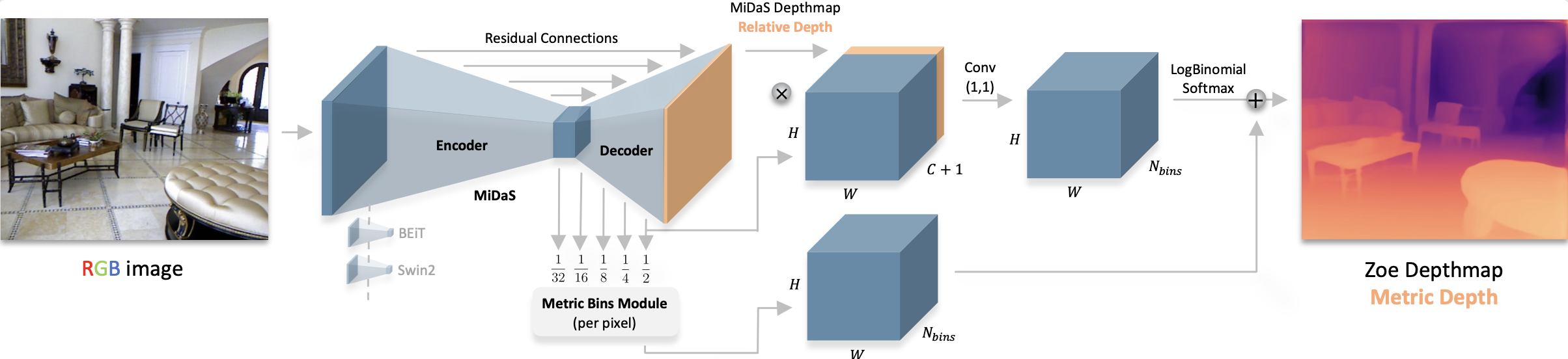 모든 원본 ZoeDepth 체크포인트는 [Intel](https://huggingface.co/Intel?search=zoedepth) 조직에서 찾을 수 있습니다.
아래 예제는 [Pipeline](/docs/transformers/v5.23.0/ko/main_classes/pipelines#transformers.Pipeline) 또는 [AutoModel](/docs/transformers/v5.23.0/ko/model_doc/auto#transformers.AutoModel) 클래스를 사용하여 깊이를 추정하는 방법을 보여줍니다.
```python
import requests
from PIL import Image
from transformers import pipeline
url = "https://huggingface.co/datasets/huggingface/documentation-images/resolve/main/pipeline-cat-chonk.jpeg"
image = Image.open(requests.get(url, stream=True).raw)
pipeline = pipeline(
task="depth-estimation",
model="Intel/zoedepth-nyu-kitti",
device=0
)
results = pipeline(image)
results["depth"]
```
```python
import requests
import torch
from PIL import Image
from transformers import AutoImageProcessor, AutoModelForDepthEstimation
image_processor = AutoImageProcessor.from_pretrained(
"Intel/zoedepth-nyu-kitti"
)
model = AutoModelForDepthEstimation.from_pretrained(
"Intel/zoedepth-nyu-kitti",
device_map="auto"
)
url = "https://huggingface.co/datasets/huggingface/documentation-images/resolve/main/pipeline-cat-chonk.jpeg"
image = Image.open(requests.get(url, stream=True).raw)
inputs = image_processor(image, return_tensors="pt").to(model.device)
with torch.no_grad():
outputs = model(inputs)
# interpolate to original size and visualize the prediction
## ZoeDepth dynamically pads the input image, so pass the original image size as argument
## to `post_process_depth_estimation` to remove the padding and resize to original dimensions.
post_processed_output = image_processor.post_process_depth_estimation(
outputs,
source_sizes=[(image.height, image.width)],
)
predicted_depth = post_processed_output[0]["predicted_depth"]
depth = (predicted_depth - predicted_depth.min()) / (predicted_depth.max() - predicted_depth.min())
depth = depth.detach().cpu().numpy() * 255
Image.fromarray(depth.astype("uint8"))
```
## The input is a single word "Notes".
참고
- [원래 구현](https://github.com/isl-org/ZoeDepth/blob/edb6daf45458569e24f50250ef1ed08c015f17a7/zoedepth/models/depth_model.py#L131)에서 ZoeDepth는 원본 이미지와 뒤집힌 이미지 모두에 대해 추론을 수행하고 결과를 평균화합니다. `post_process_depth_estimation` 함수는 아래에 표시된 대로 뒤집힌 출력을 선택적 `outputs_flipped` 인수로 전달하여 이를 처리합니다.
```py
with torch.no_grad():
outputs = model(pixel_values)
outputs_flipped = model(pixel_values=torch.flip(inputs.pixel_values, dims=[3]))
post_processed_output = image_processor.post_process_depth_estimation(
outputs,
source_sizes=[(image.height, image.width)],
outputs_flipped=outputs_flipped,
)
```
## 리소스
- 추론 예제는 이 [노트북](https://github.com/NielsRogge/Transformers-Tutorials/tree/master/ZoeDepth)을 참고하세요.
## ZoeDepthConfig[[transformers.ZoeDepthConfig]]
#### transformers.ZoeDepthConfig[[transformers.ZoeDepthConfig]]
```python
transformers.ZoeDepthConfig(transformers_version: str | None = None, architectures: list[str] | None = None, output_hidden_states: bool | None = False, return_dict: bool | None = True, dtype: str | torch.dtype | None = None, chunk_size_feed_forward: int = 0, is_encoder_decoder: bool = False, id2label: dict[int, str] | dict[str, str] | None = None, label2id: dict[str, int] | dict[str, str] | None = None, problem_type: Literal['regression', 'single_label_classification', 'multi_label_classification'] | None = None, backbone_config: dict | transformers.configuration_utils.PreTrainedConfig | None = None, hidden_act: str = 'gelu', initializer_range: float = 0.02, batch_norm_eps: float = 1e-05, readout_type: typing.Literal['ignore', 'add', 'project'] = 'project', reassemble_factors: list[int | float] | tuple[int | float, ...] = (4, 2, 1, 0.5), neck_hidden_sizes: list[int] | tuple[int, ...] = (96, 192, 384, 768), fusion_hidden_size: int = 256, head_in_index: int = -1, use_batch_norm_in_fusion_residual: bool = False, use_bias_in_fusion_residual: bool | None = None, num_relative_features: int = 32, add_projection: bool = False, bottleneck_features: int = 256, num_attractors: list[int] | tuple[int, ...] = (16, 8, 4, 1), bin_embedding_dim: int = 128, attractor_alpha: int = 1000, attractor_gamma: int = 2, attractor_kind: typing.Literal['mean', 'sum'] = 'mean', min_temp: float = 0.0212, max_temp: float = 50.0, bin_centers_type: str = 'softplus', bin_configurations: list[dict] | None = None, num_patch_transformer_layers: int | None = None, patch_transformer_hidden_size: int | None = None, patch_transformer_intermediate_size: int | None = None, patch_transformer_num_attention_heads: int | None = None)
```
[소스](https://github.com/huggingface/transformers/blob/v5.23.0/src/transformers/models/zoedepth/configuration_zoedepth.py#L32)
**매개변수:**
backbone_config (`Union[dict, ~configuration_utils.PreTrainedConfig]`, *선택*) : 백본 모델의 구성입니다.
hidden_act (`str`, *선택 사항*, 기본값 `gelu`) : 디코더에서 사용되는 비선형 활성화 함수(함수 또는 문자열). 예를 들어, `"gelu"`, `"relu"`, `"silu"` 등이 있습니다.
initializer_range (`float`, *선택 사항*, 기본값 `0.02`) : 모든 가중치 행렬을 초기화하는 truncated_normal_initializer의 표준 편차입니다.
batch_norm_eps (`float`, *선택 사항*, 기본값 `1e-05`) : 배치 정규화 레이어에서 사용되는 epsilon 값입니다.
readout_type (`str`, *선택 사항*, 기본값 `"project"`) : ViT 백본의 중간 숨겨진 상태에서 readout 토큰(CLS 토큰)을 처리할 때 사용할 readout 유형입니다. [`"ignore"`, `"add"`, `"project"`] 중 하나여야 합니다. - "ignore"는 CLS 토큰을 단순히 무시합니다. - "add"는 표현을 추가하여 CLS 토큰의 정보를 다른 모든 토큰으로 전달합니다. - "project"는 선형 레이어와 GELU 비선형성을 적용하여 표현을 원래의 특징 차원 D로 투사하기 전에 readout을 다른 모든 토큰에 연결(concatenate)하여 다른 토큰으로 정보를 전달합니다.
reassemble_factors (`list[int]`, *선택 사항*, 기본값 `[4, 2, 1, 0.5]`) : reassemble 레이어의 업/다운샘플링 계수입니다.
neck_hidden_sizes (`list[str]`, *선택 사항*, 기본값 `[96, 192, 384, 768]`) : 백본의 feature maps를 투영할 hidden sizes입니다.
fusion_hidden_size (`int`, *선택 사항*, 기본값 256) : 융합 전 채널 수.
head_in_index (`int`, *선택 사항*, 기본값 -1) : 헤드에서 사용할 기능의 인덱스입니다.
use_batch_norm_in_fusion_residual (`bool`, *선택 사항*, 기본값 `False`) : fusion 블록의 pre-activate residual units에서 batch normalization을 사용할지 여부입니다.
use_bias_in_fusion_residual (`bool`, *선택 사항*, 기본값 `True`) : fusion 블록의 pre-activate residual unit에 bias를 사용할지 여부입니다.
num_relative_features (`int`, *선택 사항*, 기본값 32) : 상대 깊이 추정 헤드에 사용할 특징의 수입니다.
add_projection (`bool`, *선택 사항*, 기본값 `False`) : 깊이 추정 헤드 앞에 투영 레이어를 추가할지 여부.
bottleneck_features (`int`, *선택 사항*, 기본값 256) : bottleneck 레이어의 특징 수입니다.
num_attractors (`list[int], *optional*, defaults to `[16, 8, 4, 1]`) : 각 단계에서 사용할 attractor의 수.
bin_embedding_dim (`int`, *선택 사항*, 기본값 128) : bin 임베딩의 차원입니다.
attractor_alpha (`int`, *선택 사항*, 기본값 1000) : attractor에서 사용할 alpha 값입니다.
attractor_gamma (`int`, *선택 사항*, 기본값 2) : 어트랙터에 사용할 감마 값입니다.
attractor_kind (`str`, *선택 사항*, 기본값 `"mean"`) : 사용할 attractor의 종류입니다. [`"mean"`, `"sum"`] 중 하나여야 합니다.
min_temp (`float`, *선택 사항*, 기본값 0.0212) : 고려할 최소 온도 값입니다.
max_temp (`float`, *선택 사항*, 기본값 50.0) : 고려할 최대 온도 값입니다.
bin_centers_type (`str`, *선택 사항*, 기본값 `"softplus"`) : bin center에 사용되는 활성화 유형입니다. "normed" 또는 "softplus"를 사용할 수 있습니다. "normed" bin center의 경우 선형 정규화 트릭이 적용되어 bin center가 제한됩니다. "softplus"의 경우 softplus 활성화가 사용되므로 제한이 없습니다.
bin_configurations (`list[dict]`, *선택 사항*, 기본값은 `[{'n_bins' : 64, 'min_depth': 0.001, 'max_depth': 10.0}]`): 각 bin head에 대한 설정입니다. 각 설정에는 다음 키가 포함되어야 합니다: - name (`str`): bin head의 이름 - 여러 bin 설정이 있는 경우에만 필요합니다. - `n_bins` (`int`): 사용할 bin의 수입니다. - `min_depth` (`float`): 고려할 최소 깊이 값입니다. - `max_depth` (`float`): 고려할 최대 깊이 값입니다. 단일 설정만 전달되면 모델은 지정된 설정을 가진 단일 head를 사용합니다. 여러 설정이 전달되면 모델은 지정된 설정을 가진 여러 head를 사용합니다.
num_patch_transformer_layers (`int`, *선택 사항*) : 패치 transformer에 사용할 transformer 레이어의 수입니다. 여러 개의 bin 구성을 사용하는 경우에만 사용됩니다.
patch_transformer_hidden_size (`int`, *선택 사항*) : 패치 트랜스포머에서 사용할 hidden size입니다. 여러 개의 bin 구성을 사용하는 경우에만 사용됩니다.
patch_transformer_intermediate_size (`int`, *선택 사항*) : 패치 트랜스포머에서 사용할 중간 크기입니다. 여러 개의 bin 구성을 사용하는 경우에만 사용됩니다.
patch_transformer_num_attention_heads (`int`, *선택 사항*) : 패치 트랜스포머에 사용할 어텐션 헤드 수입니다. 여러 개의 빈 구성을 사용하는 경우에만 사용됩니다.
이것은 ZoedepthModel의 구성을 저장하기 위한 구성 클래스입니다. 지정된 인자에 따라 Zoedepth 모델을 초기화하고 모델 아키텍처를 정의하는 데 사용됩니다. 기본값으로 구성을 초기화하면 [Intel/zoedepth-nyu](https://huggingface.co/Intel/zoedepth-nyu)와 유사한 구성이 생성됩니다.
Configuration 객체는 [PreTrainedConfig](/docs/transformers/v5.23.0/ko/main_classes/configuration#transformers.PreTrainedConfig)를 상속하며, 모델 출력을 제어하는 데 사용할 수 있습니다. 자세한 내용은 [PreTrainedConfig](/docs/transformers/v5.23.0/ko/main_classes/configuration#transformers.PreTrainedConfig)의 문서를 참고하세요.
예:
```python
>>> from transformers import ZoeDepthConfig, ZoeDepthForDepthEstimation
>>> # Initializing a ZoeDepth zoedepth-large style configuration
>>> configuration = ZoeDepthConfig()
>>> # Initializing a model from the zoedepth-large style configuration
>>> model = ZoeDepthForDepthEstimation(configuration)
>>> # Accessing the model configuration
>>> configuration = model.config
```
## ZoeDepthImageProcessor[[transformers.ZoeDepthImageProcessor]]
#### transformers.ZoeDepthImageProcessor[[transformers.ZoeDepthImageProcessor]]
```python
transformers.ZoeDepthImageProcessor(**kwargs: *)
```
[소스](https://github.com/huggingface/transformers/blob/v5.23.0/src/transformers/models/zoedepth/image_processing_zoedepth.py#L105)
**매개변수:**
do_convert_rgb (`bool`, *kwargs*, *선택*) : 이미지를 RGB로 변환할지 여부.
do_resize (`bool`, *kwargs*, *선택 사항*, 기본값 `True`) : 이미지를 리사이즈할지 여부.
size (`Annotated[int | list[int] | tuple[int, ...] | dict[str, int] | None, None]`, *kwargs*, 기본값 `{'height' : 384, 'width': 512}`): 모델에 대한 최대 입력 차원을 설명합니다.
default_to_square (`bool`, *kwargs*, *선택 사항*, 기본값 `True`) : size가 int인 경우 리사이즈 시 정사각형 이미지로 설정할지 여부.
crop_size (`Annotated[int | list[int] | tuple[int, ...] | dict[str, int] | None, None]`, *kwargs*) : `center_crop`를 적용한 후의 출력 이미지 크기.
resample (`Annotated[Union[int, PILImageResampling, NoneType], None]`, *kwargs*, 기본값 `2`) : 이미지를 리사이즈할 때 사용할 리샘플링 필터입니다. 이는 `PILImageResampling` enum 중 하나일 수 있습니다. `do_resize`가 `True`로 설정된 경우에만 효과가 있습니다.
do_rescale (`bool`, *kwargs*, *선택 사항*, 기본값 `True`) : 이미지를 다시 스케일링할지 여부.
rescale_factor (`float`, *kwargs*, *선택 사항*, 기본값 `0.00392156862745098`) : `do_rescale`이 `True`로 설정된 경우 이미지를 재조정하는 데 사용되는 재조정 계수입니다.
do_normalize (`bool`, *kwargs*, *선택 사항*, 기본값 `True`) : 이미지를 정규화할지 여부.
image_mean (`Union[float, list[float], tuple[float, ...]]`, *kwargs*, *선택*, 기본값은 `[0.5, 0.5, 0.5]`) : 정규화에 사용할 이미지 평균입니다. `do_normalize`가 `True`로 설정된 경우에만 효과가 있습니다.
image_std (`Union[float, list[float], tuple[float, ...]]`, *kwargs*, *선택*, 기본값 `[0.5, 0.5, 0.5]`) : 정규화에 사용할 이미지 표준 편차. `do_normalize`가 `True`로 설정된 경우에만 효과가 있습니다.
do_pad (`bool`, *kwargs*, *선택 사항*, 기본값 `True`) : 이미지를 패딩할지 여부입니다. 패딩은 배치 내 가장 큰 크기로 수행하거나 이미지마다 고정된 정사각형 크기로 수행합니다. 정확한 패딩 전략은 모델에 따라 달라집니다.
pad_size (`Annotated[int | list[int] | tuple[int, ...] | dict[str, int] | None, None]`, *kwargs*) : 이미지를 패딩할 `{"height": int, "width" int}` 크기를 지정합니다. 전처리용으로 제공된 모든 이미지 크기보다 커야 합니다. `pad_size`가 제공되지 않으면, 이미지는 배치 내 가장 큰 높이와 너비로 패딩됩니다. `do_pad=True.`일 때만 적용됩니다.
do_center_crop (`bool`, *kwargs*, *선택*) : 이미지를 중앙 크롭할지 여부.
data_format (`Union[str, ~image_utils.ChannelDimension]`, *kwargs*, *선택*) : `ChannelDimension.FIRST`만 지원됩니다. 느린 프로세서와의 호환성을 위해 추가되었습니다.
input_data_format (`Union[str, ~image_utils.ChannelDimension]`, *kwargs*, *선택*) : 입력 이미지의 채널 차원 형식입니다. 설정하지 않으면 입력 이미지에서 채널 차원 형식을 추론합니다. 다음 중 하나일 수 있습니다: - `"channels_first"` 또는 `ChannelDimension.FIRST`: (num_channels, height, width) 형식의 이미지. - `"channels_last"` 또는 `ChannelDimension.LAST`: (height, width, num_channels) 형식의 이미지. - `"none"` 또는 `ChannelDimension.NONE`: (height, width) 형식의 이미지.
device (`Annotated[Union[str, torch.device, NoneType], None]`, *kwargs*) : 비디오를 처리할 장치입니다. 설정되지 않은 경우, 입력 비디오에서 장치를 추론합니다.
return_tensors (`Annotated[str | ~utils.generic.TensorType | None, None]`, *kwargs*) : `'pt'`로 설정된 경우 스택된 텐서를 반환하고, 그렇지 않으면 텐서 목록을 반환합니다.
disable_grouping (`bool`, *kwargs*, *선택*) : 이미지의 크기에 따른 그룹화를 비활성화하여 이미지를 배치 대신 개별적으로 처리할지 여부입니다. None인 경우, 이미지가 CPU에 있으면 True, 그렇지 않으면 False로 설정됩니다. 이 선택은 https://github.com/huggingface/transformers/pull/38157에 자세히 설명된 경험적 관찰에 기반합니다.
image_seq_length (`int`, *kwargs*, *선택*) : 입력의 각 이미지에 사용할 이미지 토큰의 수입니다. 하위 호환성을 위해 추가되었지만, 향후 모델에서는 프로세서 속성으로 설정해야 합니다.
keep_aspect_ratio (`bool`, *kwargs*, *선택 사항*, 기본값은 `self.keep_aspect_ratio`) : `True`인 경우, 높이와 너비 스케일링 계수 중 더 작은 값을 선택하여 두 차원에 모두 적용하여 이미지를 리사이즈합니다. 이를 통해 원하는 출력 크기에 맞도록 하면서도 이미지가 가능한 한 적게 축소되도록 보장합니다. `ensure_multiple_of`도 설정된 경우, 높이와 너비를 해당 값의 가장 가까운 배수로 내림하여 이 값의 배수가 되는 크기로 이미지를 추가로 리사이즈합니다. `preprocess`의 `keep_aspect_ratio`로 재정의할 수 있습니다.
ensure_multiple_of (`int`, *kwargs*, *선택 사항*, 기본값은 `self.ensure_multiple_of`) : `do_resize`가 `True`인 경우, 이미지는 이 값의 배수가 되는 크기로 리사이즈됩니다. 높이와 너비를 이 값의 가장 가까운 배수로 내림하여 동작합니다. `keep_aspect_ratio`가 `True`로 설정되어 있거나 없거나 모두 동작합니다. `preprocess`의 `ensure_multiple_of`에 의해 재정의될 수 있습니다.
ZoeDepthImageProcessor 이미지 프로세서를 생성합니다.
#### preprocess[[transformers.ZoeDepthImageProcessor.preprocess]]
```python
preprocess(images: typing.Union[ForwardRef('PIL.Image.Image'), numpy.ndarray, ForwardRef('torch.Tensor'), list['PIL.Image.Image'], list[numpy.ndarray], list['torch.Tensor']], **kwargs: *)
```
[소스](https://github.com/huggingface/transformers/blob/v5.23.0/src/transformers/models/zoedepth/image_processing_zoedepth.py#L121)
**매개변수:**
images (`Union[PIL.Image.Image, numpy.ndarray, torch.Tensor, list[PIL.Image.Image], list[numpy.ndarray], list[torch.Tensor]]`) : 전처리할 이미지. 픽셀 값이 0에서 255 범위로 이루어진 단일 이미지 또는 배치 이미지를 기대합니다. 픽셀 값이 0에서 1 범위로 이루어진 이미지를 전달하는 경우 `do_rescale=False`로 설정하세요.
do_convert_rgb (`bool`, *kwargs*, *선택*) : 이미지를 RGB로 변환할지 여부.
do_resize (`bool`, *kwargs*, *선택*) : 이미지를 리사이즈할지 여부.
size (`Annotated[int | list[int] | tuple[int, ...] | dict[str, int] | None, None]`, *kwargs*) : 모델의 최대 입력 차원을 설명합니다.
default_to_square (`bool`, *kwargs*, *선택*) : size가 int인 경우 리사이즈 시 정사각형 이미지로 기본 설정할지 여부.
crop_size (`Annotated[int | list[int] | tuple[int, ...] | dict[str, int] | None, None]`, *kwargs*) : `center_crop`를 적용한 후의 출력 이미지 크기.
resample (`Annotated[Union[int, PILImageResampling, NoneType], None]`, *kwargs*) : 이미지를 리사이즈할 때 사용할 리샘플링 필터입니다. `PILImageResampling` enum 중 하나를 사용할 수 있습니다. `do_resize`가 `True`로 설정된 경우에만 효과가 있습니다.
do_rescale (`bool`, *kwargs*, *선택*) : 이미지를 다시 스케일링할지 여부.
rescale_factor (`float`, *kwargs*, *선택*) : `do_rescale`가 `True`로 설정된 경우 이미지를 재조정하는 데 사용되는 재조정 계수입니다.
do_normalize (`bool`, *kwargs*, *선택*) : 이미지를 정규화할지 여부.
image_mean (`Union[float, list[float], tuple[float, ...]]`, *kwargs*, *선택*) : 정규화에 사용할 이미지 평균값. `do_normalize`이 `True`로 설정된 경우에만 효과가 있습니다.
image_std (`Union[float, list[float], tuple[float, ...]]`, *kwargs*, *선택*) : 정규화에 사용할 이미지 표준 편차. `do_normalize`가 `True`로 설정된 경우에만 효과가 있습니다.
do_pad (`bool`, *kwargs*, *선택*) : 이미지를 패딩할지 여부입니다. 패딩은 배치 내 가장 큰 크기로 수행하거나, 이미지마다 고정된 정사각형 크기로 수행합니다. 정확한 패딩 전략은 모델에 따라 달라집니다.
pad_size (`Annotated[int | list[int] | tuple[int, ...] | dict[str, int] | None, None]`, *kwargs*) : 이미지를 패딩할 `{"height": int, "width" int}` 크기를 지정합니다. 전처리용으로 제공된 모든 이미지 크기보다 커야 합니다. `pad_size`가 제공되지 않으면, 이미지는 배치 내 가장 큰 높이와 너비로 패딩됩니다. `do_pad=True.`일 때만 적용됩니다.
do_center_crop (`bool`, *kwargs*, *선택*) : 이미지를 중앙 크롭할지 여부.
data_format (`Union[str, ~image_utils.ChannelDimension]`, *kwargs*, *선택*) : `ChannelDimension.FIRST`만 지원됩니다. 느린 프로세서와의 호환성을 위해 추가되었습니다.
input_data_format (`Union[str, ~image_utils.ChannelDimension]`, *kwargs*, *선택*) : 입력 이미지의 채널 차원 형식입니다. 설정하지 않으면 입력 이미지에서 채널 차원 형식을 추론합니다. 다음 중 하나일 수 있습니다: - `"channels_first"` 또는 `ChannelDimension.FIRST`: (num_channels, height, width) 형식의 이미지. - `"channels_last"` 또는 `ChannelDimension.LAST`: (height, width, num_channels) 형식의 이미지. - `"none"` 또는 `ChannelDimension.NONE`: (height, width) 형식의 이미지.
device (`Annotated[Union[str, torch.device, NoneType], None]`, *kwargs*) : 비디오를 처리할 장치입니다. 설정되지 않은 경우, 입력 비디오에서 장치를 추론합니다.
return_tensors (`Annotated[str | ~utils.generic.TensorType | None, None]`, *kwargs*) : `'pt'`로 설정된 경우 스택된 텐서를 반환하고, 그렇지 않으면 텐서 목록을 반환합니다.
disable_grouping (`bool`, *kwargs*, *선택*) : 이미지의 크기에 따른 그룹화를 비활성화하여 이미지를 배치 대신 개별적으로 처리할지 여부입니다. None인 경우, 이미지가 CPU에 있으면 True, 그렇지 않으면 False로 설정됩니다. 이 선택은 https://github.com/huggingface/transformers/pull/38157에 자세히 설명된 경험적 관찰에 기반합니다.
image_seq_length (`int`, *kwargs*, *선택*) : 입력의 각 이미지에 사용할 이미지 토큰의 수입니다. 하위 호환성을 위해 추가되었지만, 향후 모델에서는 프로세서 속성으로 설정해야 합니다.
keep_aspect_ratio (`bool`, *kwargs*, *선택 사항*, 기본값은 `self.keep_aspect_ratio`) : `True`인 경우, 높이와 너비 스케일링 계수 중 더 작은 값을 선택하여 두 차원에 모두 적용하여 이미지를 리사이즈합니다. 이를 통해 원하는 출력 크기에 맞도록 하면서도 이미지가 가능한 한 적게 축소되도록 보장합니다. `ensure_multiple_of`도 설정된 경우, 높이와 너비를 해당 값의 가장 가까운 배수로 내림하여 이 값의 배수가 되는 크기로 이미지를 추가로 리사이즈합니다. `preprocess`의 `keep_aspect_ratio`로 재정의할 수 있습니다.
ensure_multiple_of (`int`, *kwargs*, *선택 사항*, 기본값은 `self.ensure_multiple_of`) : `do_resize`가 `True`인 경우, 이미지는 이 값의 배수가 되는 크기로 리사이즈됩니다. 높이와 너비를 이 값의 가장 가까운 배수로 내림하여 동작합니다. `keep_aspect_ratio`가 `True`로 설정되어 있거나 없거나 모두 동작합니다. `preprocess`의 `ensure_multiple_of`에 의해 재정의될 수 있습니다.
**반환값:** `~image_processing_base.BatchFeature`
- **data** (`dict`) -- __call__ 메서드가 반환하는 리스트/배열/텐서 딕셔너리('pixel_values' 등).
- **tensor_type** (`Union[None, str, TensorType]`, *선택 사항*) -- 초기화 시 PyTorch/Numpy 텐서에서 정수 목록을 변환하려면 여기에 tensor_type을 지정할 수 있습니다.
## ZoeDepthImageProcessorPil[[transformers.ZoeDepthImageProcessorPil]]
#### transformers.ZoeDepthImageProcessorPil[[transformers.ZoeDepthImageProcessorPil]]
```python
transformers.ZoeDepthImageProcessorPil(**kwargs: *)
```
[소스](https://github.com/huggingface/transformers/blob/v5.23.0/src/transformers/models/zoedepth/image_processing_pil_zoedepth.py#L113)
**매개변수:**
do_convert_rgb (`bool`, *kwargs*, *선택*) : 이미지를 RGB로 변환할지 여부.
do_resize (`bool`, *kwargs*, *선택 사항*, 기본값 `True`) : 이미지를 리사이즈할지 여부.
size (`Annotated[int | list[int] | tuple[int, ...] | dict[str, int] | None, None]`, *kwargs*, 기본값 `{'height' : 384, 'width': 512}`): 모델에 대한 최대 입력 차원을 설명합니다.
default_to_square (`bool`, *kwargs*, *선택 사항*, 기본값 `True`) : size가 int인 경우 리사이즈 시 정사각형 이미지로 설정할지 여부.
crop_size (`Annotated[int | list[int] | tuple[int, ...] | dict[str, int] | None, None]`, *kwargs*) : `center_crop`를 적용한 후의 출력 이미지 크기.
resample (`Annotated[Union[int, PILImageResampling, NoneType], None]`, *kwargs*, 기본값 `2`) : 이미지를 리사이즈할 때 사용할 리샘플링 필터입니다. 이는 `PILImageResampling` enum 중 하나일 수 있습니다. `do_resize`가 `True`로 설정된 경우에만 효과가 있습니다.
do_rescale (`bool`, *kwargs*, *선택 사항*, 기본값 `True`) : 이미지를 다시 스케일링할지 여부.
rescale_factor (`float`, *kwargs*, *선택 사항*, 기본값 `0.00392156862745098`) : `do_rescale`이 `True`로 설정된 경우 이미지를 재조정하는 데 사용되는 재조정 계수입니다.
do_normalize (`bool`, *kwargs*, *선택 사항*, 기본값 `True`) : 이미지를 정규화할지 여부.
image_mean (`Union[float, list[float], tuple[float, ...]]`, *kwargs*, *선택*, 기본값은 `[0.5, 0.5, 0.5]`) : 정규화에 사용할 이미지 평균입니다. `do_normalize`가 `True`로 설정된 경우에만 효과가 있습니다.
image_std (`Union[float, list[float], tuple[float, ...]]`, *kwargs*, *선택*, 기본값 `[0.5, 0.5, 0.5]`) : 정규화에 사용할 이미지 표준 편차. `do_normalize`가 `True`로 설정된 경우에만 효과가 있습니다.
do_pad (`bool`, *kwargs*, *선택 사항*, 기본값 `True`) : 이미지를 패딩할지 여부입니다. 패딩은 배치 내 가장 큰 크기로 수행하거나 이미지마다 고정된 정사각형 크기로 수행합니다. 정확한 패딩 전략은 모델에 따라 달라집니다.
pad_size (`Annotated[int | list[int] | tuple[int, ...] | dict[str, int] | None, None]`, *kwargs*) : 이미지를 패딩할 `{"height": int, "width" int}` 크기를 지정합니다. 전처리용으로 제공된 모든 이미지 크기보다 커야 합니다. `pad_size`가 제공되지 않으면, 이미지는 배치 내 가장 큰 높이와 너비로 패딩됩니다. `do_pad=True.`일 때만 적용됩니다.
do_center_crop (`bool`, *kwargs*, *선택*) : 이미지를 중앙 크롭할지 여부.
data_format (`Union[str, ~image_utils.ChannelDimension]`, *kwargs*, *선택*) : `ChannelDimension.FIRST`만 지원됩니다. 느린 프로세서와의 호환성을 위해 추가되었습니다.
input_data_format (`Union[str, ~image_utils.ChannelDimension]`, *kwargs*, *선택*) : 입력 이미지의 채널 차원 형식입니다. 설정하지 않으면 입력 이미지에서 채널 차원 형식을 추론합니다. 다음 중 하나일 수 있습니다: - `"channels_first"` 또는 `ChannelDimension.FIRST`: (num_channels, height, width) 형식의 이미지. - `"channels_last"` 또는 `ChannelDimension.LAST`: (height, width, num_channels) 형식의 이미지. - `"none"` 또는 `ChannelDimension.NONE`: (height, width) 형식의 이미지.
device (`Annotated[Union[str, torch.device, NoneType], None]`, *kwargs*) : 비디오를 처리할 장치입니다. 설정되지 않은 경우, 입력 비디오에서 장치를 추론합니다.
return_tensors (`Annotated[str | ~utils.generic.TensorType | None, None]`, *kwargs*) : `'pt'`로 설정된 경우 스택된 텐서를 반환하고, 그렇지 않으면 텐서 목록을 반환합니다.
disable_grouping (`bool`, *kwargs*, *선택*) : 이미지의 크기에 따른 그룹화를 비활성화하여 이미지를 배치 대신 개별적으로 처리할지 여부입니다. None인 경우, 이미지가 CPU에 있으면 True, 그렇지 않으면 False로 설정됩니다. 이 선택은 https://github.com/huggingface/transformers/pull/38157에 자세히 설명된 경험적 관찰에 기반합니다.
image_seq_length (`int`, *kwargs*, *선택*) : 입력의 각 이미지에 사용할 이미지 토큰의 수입니다. 하위 호환성을 위해 추가되었지만, 향후 모델에서는 프로세서 속성으로 설정해야 합니다.
keep_aspect_ratio (`bool`, *kwargs*, *선택 사항*, 기본값은 `self.keep_aspect_ratio`) : `True`인 경우, 높이와 너비 스케일링 계수 중 더 작은 값을 선택하여 두 차원에 모두 적용하여 이미지를 리사이즈합니다. 이를 통해 원하는 출력 크기에 맞도록 하면서도 이미지가 가능한 한 적게 축소되도록 보장합니다. `ensure_multiple_of`도 설정된 경우, 높이와 너비를 해당 값의 가장 가까운 배수로 내림하여 이 값의 배수가 되는 크기로 이미지를 추가로 리사이즈합니다. `preprocess`의 `keep_aspect_ratio`로 재정의할 수 있습니다.
ensure_multiple_of (`int`, *kwargs*, *선택 사항*, 기본값은 `self.ensure_multiple_of`) : `do_resize`가 `True`인 경우, 이미지는 이 값의 배수가 되는 크기로 리사이즈됩니다. 높이와 너비를 이 값의 가장 가까운 배수로 내림하여 동작합니다. `keep_aspect_ratio`가 `True`로 설정되어 있거나 없거나 모두 동작합니다. `preprocess`의 `ensure_multiple_of`에 의해 재정의될 수 있습니다.
ZoeDepthImageProcessor 이미지 프로세서를 생성합니다.
#### preprocess[[transformers.ZoeDepthImageProcessorPil.preprocess]]
```python
preprocess(images: typing.Union[ForwardRef('PIL.Image.Image'), numpy.ndarray, ForwardRef('torch.Tensor'), list['PIL.Image.Image'], list[numpy.ndarray], list['torch.Tensor']], **kwargs: *)
```
[소스](https://github.com/huggingface/transformers/blob/v5.23.0/src/transformers/models/zoedepth/image_processing_pil_zoedepth.py#L129)
**매개변수:**
images (`Union[PIL.Image.Image, numpy.ndarray, torch.Tensor, list[PIL.Image.Image], list[numpy.ndarray], list[torch.Tensor]]`) : 전처리할 이미지. 픽셀 값이 0에서 255 범위로 이루어진 단일 이미지 또는 배치 이미지를 기대합니다. 픽셀 값이 0에서 1 범위로 이루어진 이미지를 전달하는 경우 `do_rescale=False`로 설정하세요.
do_convert_rgb (`bool`, *kwargs*, *선택*) : 이미지를 RGB로 변환할지 여부.
do_resize (`bool`, *kwargs*, *선택*) : 이미지를 리사이즈할지 여부.
size (`Annotated[int | list[int] | tuple[int, ...] | dict[str, int] | None, None]`, *kwargs*) : 모델의 최대 입력 차원을 설명합니다.
default_to_square (`bool`, *kwargs*, *선택*) : size가 int인 경우 리사이즈 시 정사각형 이미지로 기본 설정할지 여부.
crop_size (`Annotated[int | list[int] | tuple[int, ...] | dict[str, int] | None, None]`, *kwargs*) : `center_crop`를 적용한 후의 출력 이미지 크기.
resample (`Annotated[Union[int, PILImageResampling, NoneType], None]`, *kwargs*) : 이미지를 리사이즈할 때 사용할 리샘플링 필터입니다. `PILImageResampling` enum 중 하나를 사용할 수 있습니다. `do_resize`가 `True`로 설정된 경우에만 효과가 있습니다.
do_rescale (`bool`, *kwargs*, *선택*) : 이미지를 다시 스케일링할지 여부.
rescale_factor (`float`, *kwargs*, *선택*) : `do_rescale`가 `True`로 설정된 경우 이미지를 재조정하는 데 사용되는 재조정 계수입니다.
do_normalize (`bool`, *kwargs*, *선택*) : 이미지를 정규화할지 여부.
image_mean (`Union[float, list[float], tuple[float, ...]]`, *kwargs*, *선택*) : 정규화에 사용할 이미지 평균값. `do_normalize`이 `True`로 설정된 경우에만 효과가 있습니다.
image_std (`Union[float, list[float], tuple[float, ...]]`, *kwargs*, *선택*) : 정규화에 사용할 이미지 표준 편차. `do_normalize`가 `True`로 설정된 경우에만 효과가 있습니다.
do_pad (`bool`, *kwargs*, *선택*) : 이미지를 패딩할지 여부입니다. 패딩은 배치 내 가장 큰 크기로 수행하거나, 이미지마다 고정된 정사각형 크기로 수행합니다. 정확한 패딩 전략은 모델에 따라 달라집니다.
pad_size (`Annotated[int | list[int] | tuple[int, ...] | dict[str, int] | None, None]`, *kwargs*) : 이미지를 패딩할 `{"height": int, "width" int}` 크기를 지정합니다. 전처리용으로 제공된 모든 이미지 크기보다 커야 합니다. `pad_size`가 제공되지 않으면, 이미지는 배치 내 가장 큰 높이와 너비로 패딩됩니다. `do_pad=True.`일 때만 적용됩니다.
do_center_crop (`bool`, *kwargs*, *선택*) : 이미지를 중앙 크롭할지 여부.
data_format (`Union[str, ~image_utils.ChannelDimension]`, *kwargs*, *선택*) : `ChannelDimension.FIRST`만 지원됩니다. 느린 프로세서와의 호환성을 위해 추가되었습니다.
input_data_format (`Union[str, ~image_utils.ChannelDimension]`, *kwargs*, *선택*) : 입력 이미지의 채널 차원 형식입니다. 설정하지 않으면 입력 이미지에서 채널 차원 형식을 추론합니다. 다음 중 하나일 수 있습니다: - `"channels_first"` 또는 `ChannelDimension.FIRST`: (num_channels, height, width) 형식의 이미지. - `"channels_last"` 또는 `ChannelDimension.LAST`: (height, width, num_channels) 형식의 이미지. - `"none"` 또는 `ChannelDimension.NONE`: (height, width) 형식의 이미지.
device (`Annotated[Union[str, torch.device, NoneType], None]`, *kwargs*) : 비디오를 처리할 장치입니다. 설정되지 않은 경우, 입력 비디오에서 장치를 추론합니다.
return_tensors (`Annotated[str | ~utils.generic.TensorType | None, None]`, *kwargs*) : `'pt'`로 설정된 경우 스택된 텐서를 반환하고, 그렇지 않으면 텐서 목록을 반환합니다.
disable_grouping (`bool`, *kwargs*, *선택*) : 이미지의 크기에 따른 그룹화를 비활성화하여 이미지를 배치 대신 개별적으로 처리할지 여부입니다. None인 경우, 이미지가 CPU에 있으면 True, 그렇지 않으면 False로 설정됩니다. 이 선택은 https://github.com/huggingface/transformers/pull/38157에 자세히 설명된 경험적 관찰에 기반합니다.
image_seq_length (`int`, *kwargs*, *선택*) : 입력의 각 이미지에 사용할 이미지 토큰의 수입니다. 하위 호환성을 위해 추가되었지만, 향후 모델에서는 프로세서 속성으로 설정해야 합니다.
keep_aspect_ratio (`bool`, *kwargs*, *선택 사항*, 기본값은 `self.keep_aspect_ratio`) : `True`인 경우, 높이와 너비 스케일링 계수 중 더 작은 값을 선택하여 두 차원에 모두 적용하여 이미지를 리사이즈합니다. 이를 통해 원하는 출력 크기에 맞도록 하면서도 이미지가 가능한 한 적게 축소되도록 보장합니다. `ensure_multiple_of`도 설정된 경우, 높이와 너비를 해당 값의 가장 가까운 배수로 내림하여 이 값의 배수가 되는 크기로 이미지를 추가로 리사이즈합니다. `preprocess`의 `keep_aspect_ratio`로 재정의할 수 있습니다.
ensure_multiple_of (`int`, *kwargs*, *선택 사항*, 기본값은 `self.ensure_multiple_of`) : `do_resize`가 `True`인 경우, 이미지는 이 값의 배수가 되는 크기로 리사이즈됩니다. 높이와 너비를 이 값의 가장 가까운 배수로 내림하여 동작합니다. `keep_aspect_ratio`가 `True`로 설정되어 있거나 없거나 모두 동작합니다. `preprocess`의 `ensure_multiple_of`에 의해 재정의될 수 있습니다.
**반환값:** `~image_processing_base.BatchFeature`
- **data** (`dict`) -- __call__ 메서드가 반환하는 리스트/배열/텐서 딕셔너리('pixel_values' 등).
- **tensor_type** (`Union[None, str, TensorType]`, *선택 사항*) -- 초기화 시 PyTorch/Numpy 텐서에서 정수 목록을 변환하려면 여기에 tensor_type을 지정할 수 있습니다.
## ZoeDepthForDepthEstimation[[transformers.ZoeDepthForDepthEstimation]]
#### transformers.ZoeDepthForDepthEstimation[[transformers.ZoeDepthForDepthEstimation]]
```python
transformers.ZoeDepthForDepthEstimation(config: ZoeDepthConfig)
```
[소스](https://github.com/huggingface/transformers/blob/v5.23.0/src/transformers/models/zoedepth/modeling_zoedepth.py#L1224)
**매개변수:**
config ([ZoeDepthConfig](/docs/transformers/v5.23.0/ko/model_doc/zoedepth#transformers.ZoeDepthConfig)) : 모델의 모든 매개변수를 포함하는 모델 구성 클래스입니다. 구성 파일로 초기화하는 것은 모델과 관련된 가중치를 로드하지 않으며, 구성 정보만 로드합니다. 모델 가중치를 로드하려면 [from_pretrained()](/docs/transformers/v5.23.0/ko/main_classes/model#transformers.PreTrainedModel.from_pretrained) 메서드를 확인하세요.
상단에 하나 또는 여러 개의 metric depth estimation head를 갖춘 ZoeDepth 모델.
이 모델은 [PreTrainedModel](/docs/transformers/v5.23.0/ko/main_classes/model#transformers.PreTrainedModel)에서 상속됩니다. 라이브러리가 모든 모델에 대해 구현하는 일반적 메서드(다운로드 또는 저장, 입력 임베딩 크기 조정, 헤드 프루닝 등)에 대해서는 상위 클래스 문서를 확인하세요.
이 모델은 또한 PyTorch [torch.nn.Module](https://pytorch.org/docs/stable/nn.html#torch.nn.Module)의 하위 클래스입니다. 일반적인 PyTorch Module처럼 사용하며, 일반적인 사용법과 동작에 관한 모든 사항은 PyTorch 문서를 참조하세요.
#### forward[[transformers.ZoeDepthForDepthEstimation.forward]]
```python
forward(pixel_values: Tensor, labels: typing.Optional[torch.LongTensor] = None, output_attentions: bool | None = None, output_hidden_states: bool | None = None, return_dict: bool | None = None, **kwargs)
```
[소스](https://github.com/huggingface/transformers/blob/v5.23.0/src/transformers/models/zoedepth/modeling_zoedepth.py#L1250)
**매개변수:**
pixel_values (`torch.Tensor`, shape `(batch_size, num_channels, image_size, image_size)`) : 입력 이미지에 해당하는 텐서입니다. 픽셀 값은 [ZoeDepthImageProcessor](/docs/transformers/v5.23.0/ko/model_doc/zoedepth#transformers.ZoeDepthImageProcessor)를 사용하여 얻을 수 있습니다. 자세한 내용은 [ZoeDepthImageProcessor.__call__()](/docs/transformers/v5.23.0/ko/model_doc/molmo2#transformers.Molmo2ImageProcessor.__call__)를 참조하세요 (`processor_class`는 이미지 처리에 [ZoeDepthImageProcessor](/docs/transformers/v5.23.0/ko/model_doc/zoedepth#transformers.ZoeDepthImageProcessor)를 사용합니다).
labels (`torch.LongTensor`, shape `(batch_size, height, width)`, *선택 사항*) : 손실을 계산하기 위한 ground truth depth estimation 맵.
output_attentions (`bool`, *선택 사항*) : 모든 어텐션 레이어의 어텐션 텐서를 반환할지 여부. 자세한 내용은 반환 텐서 섹션의 `attentions`를 참조하세요.
output_hidden_states (`bool`, *선택 사항*) : 모든 레이어의 hidden states를 반환할지 여부. 자세한 내용은 반환되는 텐서 중 `hidden_states` 항목을 참조하세요.
return_dict (`bool`, *선택 사항*) : 일반 튜플 대신 [ModelOutput](/docs/transformers/v5.23.0/ko/main_classes/output#transformers.utils.ModelOutput)를 반환할지 여부.
**반환값:** [DepthEstimatorOutput](/docs/transformers/v5.23.0/ko/main_classes/output#transformers.modeling_outputs.DepthEstimatorOutput) 또는 `tuple(torch.Tensor)`
구성([ZoeDepthConfig](/docs/transformers/v5.23.0/ko/model_doc/zoedepth#transformers.ZoeDepthConfig))과 입력에 따라 다양한 요소를 포함하는 [DepthEstimatorOutput](/docs/transformers/v5.23.0/ko/main_classes/output#transformers.modeling_outputs.DepthEstimatorOutput) 또는 `torch.Tensor`의 튜플(`return_dict=False`가 전달되거나 `config.return_dict=False`인 경우).
[ZoeDepthForDepthEstimation](/docs/transformers/v5.23.0/ko/model_doc/zoedepth#transformers.ZoeDepthForDepthEstimation)의 forward 메서드는 `__call__` 특수 메서드를 오버라이드합니다.
`Module` 인스턴스는 전처리 및 후처리 단계를 실행하는 것을 처리하지만, 이 함수는 해당 단계를 조용히 무시하므로, 순전파(forward pass) 레시피를 이 함수 내에서 정의해야 하더라도 이후에는 이 함수 대신 `Module` 인스턴스를 호출해야 합니다.
- **loss** (`torch.Tensor`, shape `(1,)`, *선택*, `labels`이 제공될 때 반환됨) -- 분류(또는 config.num_labels==1인 경우 회귀) 손실.
- **predicted_depth** (shape가 `(batch_size, height, width)`인 `torch.Tensor`) -- 각 픽셀에 대한 예측된 깊이.
- **hidden_states** (`tuple(torch.Tensor)`, *선택 사항*, `output_hidden_states=True`가 전달되었거나 `config.output_hidden_states=True`인 경우 반환됨) -- `torch.Tensor`의 튜플(모델에 임베딩 레이어가 있는 경우 임베딩 출력 1개 + 각 레이어의 출력 1개)로, 모양은 `(batch_size, num_channels, height, width)`입니다.
각 레이어의 출력에서 모델의 Hidden-states와 선택적 초기 임베딩 출력을 포함합니다.
- **attentions** (`tuple(torch.Tensor)`, *선택 사항*, `output_attentions=True`가 전달되었거나 `config.output_attentions=True`인 경우 반환) -- 각 레이어당 하나씩, shape가 `(batch_size, num_heads, patch_size, sequence_length)`인 `torch.Tensor`의 튜플.
self-attention 헤드에서 가중 평균을 계산하는 데 사용되는 attention softmax 이후의 attention 가중치입니다.
예:
```python
>>> from transformers import AutoImageProcessor, ZoeDepthForDepthEstimation
>>> import torch
>>> import numpy as np
>>> from PIL import Image
>>> from huggingface_hub.utils import httpx
>>> from io import BytesIO
>>> url = "http://images.cocodataset.org/val2017/000000039769.jpg"
>>> with httpx.stream("GET", url) as response:
... image = Image.open(BytesIO(response.read()))
>>> image_processor = AutoImageProcessor.from_pretrained("Intel/zoedepth-nyu-kitti")
>>> model = ZoeDepthForDepthEstimation.from_pretrained("Intel/zoedepth-nyu-kitti")
>>> # prepare image for the model
>>> inputs = image_processor(images=image, return_tensors="pt")
>>> with torch.no_grad():
... outputs = model(**inputs)
>>> # interpolate to original size
>>> post_processed_output = image_processor.post_process_depth_estimation(
... outputs,
... source_sizes=[(image.height, image.width)],
... )
>>> # visualize the prediction
>>> predicted_depth = post_processed_output[0]["predicted_depth"]
>>> depth = predicted_depth * 255 / predicted_depth.max()
>>> depth = depth.detach().cpu().numpy()
>>> depth = Image.fromarray(depth.astype("uint8"))
```